
I probably won't forget this but just in case I do, this is an article to explain how I got the shipping address from a sales order in Zoho Books into the template of the Package Slips.
Why?
It took me a while of playing about with the placeholder reference fields in the template before Zoho advised on a 'hidden' away setting which was key to changing what these display.
What I had:
${CONTACT.CONTACT_DISPLAYNAME}
${CONTACT.CONTACT_ADDRESS}
${CONTACT.CONTACT_CITY}
${CONTACT.CONTACT_CODE} ${CONTACT.CONTACT_STATE}
${CONTACT.CONTACT_COUNTRY}BILLING ADDRESS SHIPPING ADDRESS
------------------- -------------------
Test Company Joels PO Box
1 Test Street 1 Different Street
Test City Another City
Test State Test Zip Another State Another PostCode
Test Country A different CountryHow?
The key is a setting you need to change by going to Settings > Preferences > Packing Slip Settings > and Enable "Delivery To":
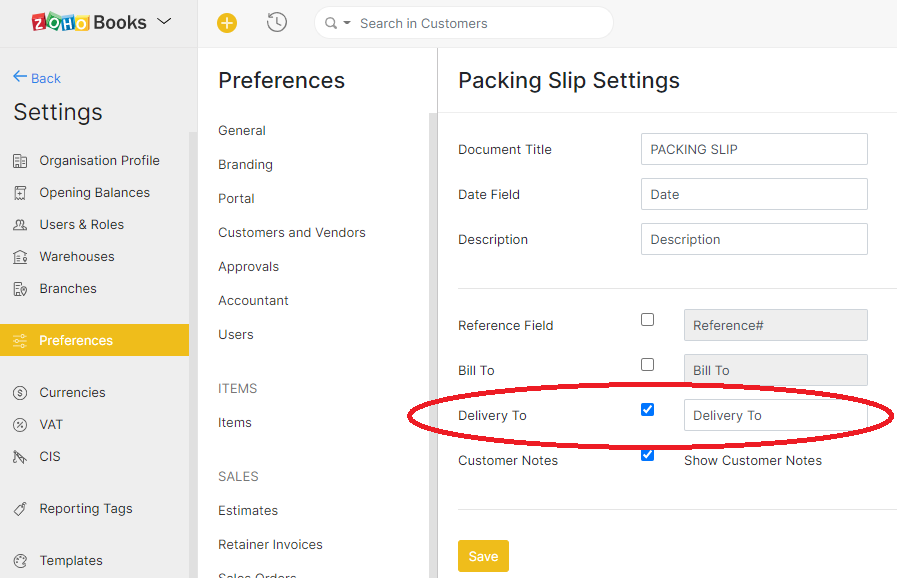
Then change the Shipping Address Format either under "Customers and Vendors" (although this applies to all templates) or under the specific template.
I wanted to do this for just the Package/Packing Slip, so:
- Go to Settings > Templates > Package Slips
- Edit the template you want to change this on
- In the left button menu, click on Header
- Scroll down and click on Shipping Address Format (Custom)
- Enter the following placeholders:
${CONTACT.CONTACT_ATTENTION} ${CONTACT.CONTACT_ADDRESS} ${CONTACT.CONTACT_CITY} ${CONTACT.CONTACT_CODE} ${CONTACT.CONTACT_STATE} ${CONTACT.CONTACT_COUNTRY} ${CONTACT.CONTACT_ADDRESS_PHONE} - Done
Source(s):
Discussion
Comments
Questions, corrections and useful additions are reviewed before appearing here.
Discussion Newest first
No comments yet. Start the discussion.