What?
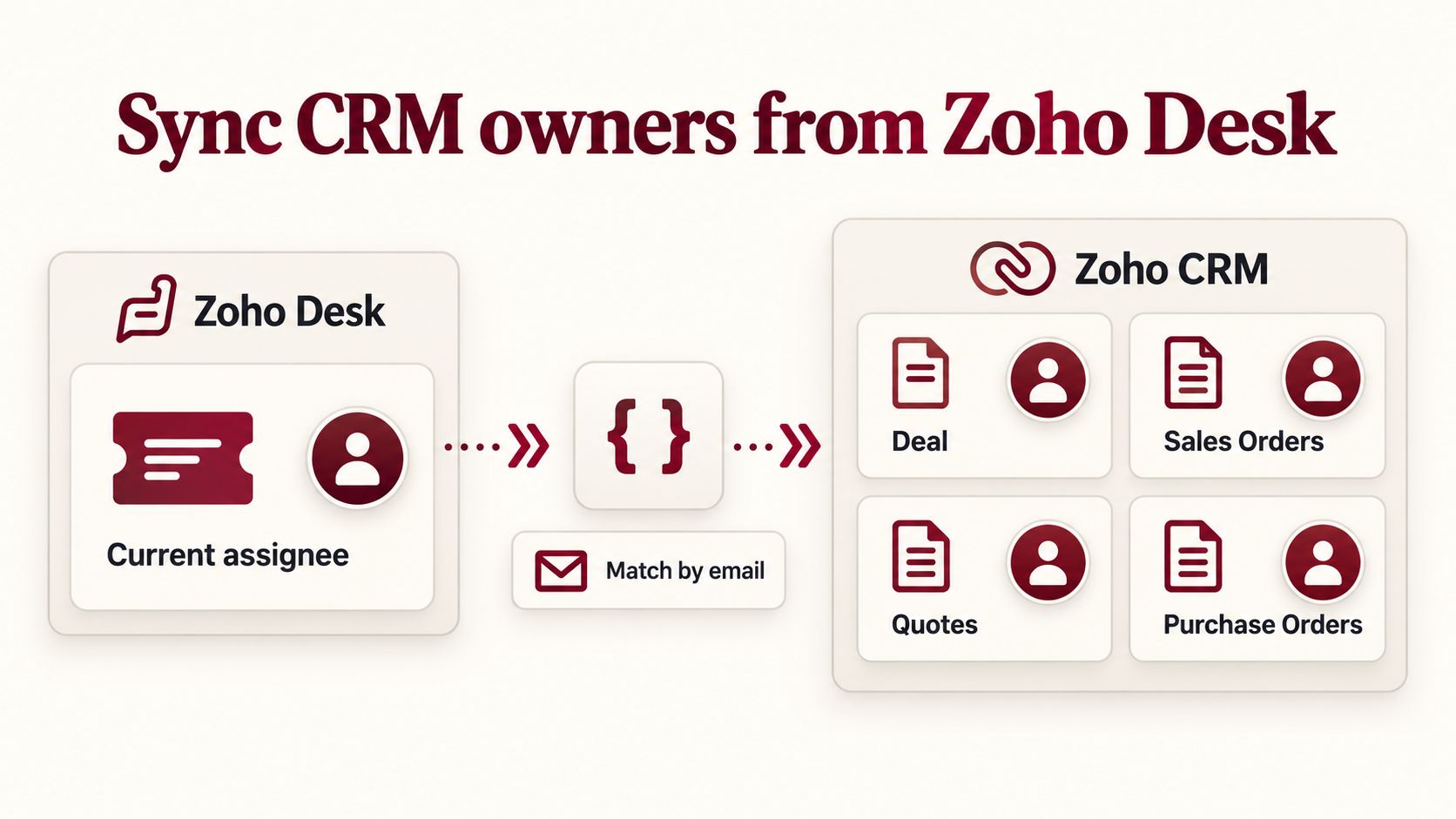
This is a quick article to document a Zoho CRM standalone function that sets the owner of a Deal and its related Sales Orders, Quotes and Purchase Orders to the CRM user matching the current assignee of a linked Zoho Desk ticket.
The function takes a Deal record ID. It retrieves the ticket ID stored on that Deal, reads the assigned Desk agent, and matches the agent's email address to an active, confirmed CRM user. That CRM user's ID is then used for the owner updates.
Why?
The use-case is a support ticket that leads to a Deal and the associated sales and purchasing records in CRM. The person responsible for the ticket in Desk should also own those records in CRM, so that ownership follows the same person across the process.
Changing the Deal owner alone does not perform the related record updates required here. This function finds the linked Sales Orders and Quotes, then the Purchase Orders linked to those records. It builds distinct lists of record IDs before making the updates, so a record found through more than one lookup is only updated once.
The matching is based on email address because the Desk agent ID and CRM user ID belong to different systems. It uses the ticket's current assignee; it does not look up who originally assigned the ticket or reconstruct assignment history.
How?
1. Prepare the Deal and its related records
The Deal needs a field containing the linked Desk ticket's internal record ID. This is the ticket ID used by the Desk API, rather than the ticket number displayed to a customer.
The function follows the relationships listed below. Check the actual field API names in your CRM before using the example. Labels can differ from API names; use the API names in the code.
| Configuration variable | Example API name | Field or relationship |
|---|---|---|
v_DealDeskTicketField | Desk_Ticket_ID | Deal field holding the Desk ticket ID. |
v_SalesOrderDealField | Deal_Name | Sales Order lookup to the Deal. |
v_SalesOrderQuoteField | Quote_Name | Sales Order lookup to a Quote. |
v_QuoteDealField | Deal_Name | Quote lookup to the Deal. |
v_QuoteSalesOrderField | Sales_Order | Quote lookup to a Sales Order. |
v_PurchaseOrderSalesOrderField | Sales_Order | Purchase Order lookup to a Sales Order. |
v_PurchaseOrderQuoteField | Quote | Purchase Order lookup to a Quote. |
The lookup names are configurable examples. In particular, Sales_Order is an example custom lookup API name, not a field to assume exists in every CRM. Set these variables to the fields used by your organisation. The module API names remain Deals, Sales_Orders, Quotes and Purchase_Orders.
2. Configure the organisation and connections
- Create and authorise a Desk connection with access to read tickets and agent details. The example uses the placeholder link name
desk_connection. - Create and authorise a CRM connection for the CRM user and COQL requests. The example uses
crm_connection. It needsZohoCRM.users.READ,ZohoCRM.coql.READand the relevant module read access. - Ensure the CRM function's execution user has permission to read the Deal and update ownership of Deals, Sales Orders, Quotes and Purchase Orders.
- Replace
v_DeskOrgID = 0;with your Desk organisation ID. Find it in Desk under Settings > Developer Space > API. - Set
v_CrmApiBaseto the API base for your CRM data centre. The public example useshttps://www.zohoapis.com/crm/v8.
Replace the placeholder connection names wherever they appear in the function. The Desk and CRM users must have matching email addresses for the user lookup to succeed.
3. Create the standalone function
- In CRM, open Setup > Developer Hub > Functions and create a function.
- Choose the Standalone category and name it
fn_Deal_SyncOwnerFromDesk. - Use a string return type and an integer argument named
p_DealID. - Paste the function below, configure the organisation, connections and field names, then save it.
The input remains p_DealID until it has been validated. The working copy is v_DealID. Other names follow the same convention: v_ for scalar values, l_ for lists, m_ for maps and r_ for responses.
string standalone.fn_Deal_SyncOwnerFromDesk(Int p_DealID)
{
/* *******************************************************************************
Function:       string standalone.fn_Deal_SyncOwnerFromDesk(Int p_DealID)
Label:          Fn - Deal - Sync Owner from Desk
Trigger:        Standalone / On-Demand
Purpose:        Set the Deal and related Sales Orders, Quotes and Purchase Orders
                to the CRM user matching the linked Desk ticket's current assignee.
Inputs:         p_DealID, mapped to the Deal record ID.
Outputs:        Update counts and any unsuccessful update responses.

Date Created:   2026-10-29 (Joel Lipman)
                - Match the Desk assignee to an active confirmed CRM user by email.
                - Update only Owner on the Deal and related records.
Date Modified:  2026-10-29 (Joel Lipman)
                - Prepare a public example using original CRM module names.
                - Replace organisation and connection details with placeholders.
                - Make lookup field API names configurable.

More Information:
                Configure the Desk organisation ID, CRM API base and connections.
                Field API names below are examples, including custom lookups.
                Uses the current ticket assignee, not assignment history.
                Suppresses workflow, approval, blueprint and orchestration
                triggers for these owner updates.
******************************************************************************* */
if(p_DealID == null || p_DealID <= 0)
{
	return "A valid Deal record ID is required.";
}
v_DealID = p_DealID.toLong();
// Replace these example settings with your organisation's configuration.
v_DeskOrgID = 0;
v_CrmApiBase = "https://www.zohoapis.com/crm/v8";
l_CrmUserPages = {1,2,3,4,5,6,7,8,9,10};
//
// Example field API names. Check and replace them for your CRM.
v_DealDeskTicketField = "Desk_Ticket_ID";
v_SalesOrderDealField = "Deal_Name";
v_SalesOrderQuoteField = "Quote_Name";
v_QuoteDealField = "Deal_Name";
v_QuoteSalesOrderField = "Sales_Order";
v_PurchaseOrderSalesOrderField = "Sales_Order";
v_PurchaseOrderQuoteField = "Quote";
if(v_DeskOrgID <= 0)
{
	return "Set v_DeskOrgID to your Desk organisation ID before running.";
}
//
// Retrieve the Deal and its linked Desk ticket.
r_Deal = zoho.crm.getRecordById("Deals",v_DealID);
if(r_Deal == null || r_Deal.get("id") == null)
{
	return "Deal could not be retrieved: " + r_Deal;
}
v_DeskTicketID = ifnull(r_Deal.get(v_DealDeskTicketField),"").function toString() { [native code] }().trim();
if(v_DeskTicketID == "")
{
	return "The Deal has no ticket ID in " + v_DealDeskTicketField + ".";
}
r_DeskTicket = zoho.desk.getRecordById(v_DeskOrgID,"tickets",v_DeskTicketID.toLong(),"desk_connection");
if(r_DeskTicket == null || r_DeskTicket.get("id") == null)
{
	return "Desk ticket could not be retrieved: " + r_DeskTicket;
}
v_DeskAssigneeID = ifnull(r_DeskTicket.get("assigneeId"),"").function toString() { [native code] }();
if(v_DeskAssigneeID == "")
{
	return "The Desk ticket has no assigned agent.";
}
//
// Match the Desk agent to an active, confirmed CRM user by email.
r_DeskAgent = zoho.desk.getRecordById(v_DeskOrgID,"agents",v_DeskAssigneeID.toLong(),"desk_connection");
if(r_DeskAgent == null || r_DeskAgent.get("id") == null)
{
	return "Desk agent could not be retrieved: " + r_DeskAgent;
}
v_DeskAgentEmail = ifnull(r_DeskAgent.get("emailId"),"").trim();
if(v_DeskAgentEmail == "")
{
	return "The Desk agent has no email address.";
}
v_CrmOwnerID = "";
v_MoreCrmUsers = false;
for each v_UserPage in l_CrmUserPages
{
	r_CrmUsers = invokeurl
	[
		url :v_CrmApiBase + "/users?type=ActiveConfirmedUsers&per_page=200&page=" + v_UserPage
		type :GET
		connection:"crm_connection"
	];
	if(r_CrmUsers == null || r_CrmUsers.get("users") == null)
	{
		return "CRM users could not be retrieved: " + r_CrmUsers;
	}
	l_CrmUsers = r_CrmUsers.get("users");
	for each m_CrmUser in l_CrmUsers
	{
		if(v_DeskAgentEmail.equalsIgnoreCase(ifnull(m_CrmUser.get("email"),"").trim()))
		{
			v_CrmOwnerID = m_CrmUser.get("id");
			break;
		}
	}
	if(v_CrmOwnerID != "")
	{
		break;
	}
	m_CrmUserPageInfo = ifnull(r_CrmUsers.get("info"),Map());
	v_MoreCrmUsers = ifnull(m_CrmUserPageInfo.get("more_records"),l_CrmUsers.size() == 200);
	if(v_MoreCrmUsers == false)
	{
		break;
	}
}
if(v_CrmOwnerID == "")
{
	if(v_MoreCrmUsers == true)
	{
		return "No matching user found within the first 2,000 active confirmed CRM users. No records updated.";
	}
	return "No active confirmed CRM user matches the Desk agent email: " + v_DeskAgentEmail;
}
//
// Retrieve existing Sales Orders and their Quote lookups before updating any records.
m_CoqlRequest = Map();
m_CoqlRequest.put("select_query","select id, " + v_SalesOrderQuoteField + " from Sales_Orders where " + v_SalesOrderDealField + " = " + v_DealID + " limit 0,2000");
r_SalesOrders = invokeurl
[
	url :v_CrmApiBase + "/coql"
	type :POST
	parameters:m_CoqlRequest.toString()
	headers:{"Content-Type":"application/json"}
	connection:"crm_connection"
];
l_SalesOrders = List();
if(r_SalesOrders != null && r_SalesOrders.function toString() { [native code] }() != "")
{
	if(r_SalesOrders.get("code") != null)
	{
		return "Linked Sales Orders could not be retrieved. No records updated: " + r_SalesOrders.function toString() { [native code] }();
	}
	l_SalesOrders = ifnull(r_SalesOrders.get("data"),List());
	m_SalesOrderPageInfo = ifnull(r_SalesOrders.get("info"),Map());
	if(ifnull(m_SalesOrderPageInfo.get("more_records"),false))
	{
		return "More than 2,000 linked Sales Orders were found. No records updated.";
	}
}
l_SalesOrderIDs = List();
l_QuoteIDs = List();
for each m_SalesOrder in l_SalesOrders
{
	v_SalesOrderID = ifnull(m_SalesOrder.get("id"),"").function toString() { [native code] }();
	if(v_SalesOrderID != "" && l_SalesOrderIDs.contains(v_SalesOrderID) == false)
	{
		l_SalesOrderIDs.add(v_SalesOrderID);
	}
	m_SalesOrderQuote = ifnull(m_SalesOrder.get(v_SalesOrderQuoteField),Map());
	v_QuoteID = ifnull(m_SalesOrderQuote.get("id"),"").function toString() { [native code] }();
	if(v_QuoteID != "" && l_QuoteIDs.contains(v_QuoteID) == false)
	{
		l_QuoteIDs.add(v_QuoteID);
	}
}
m_RelatedRecordIDs = Map();
m_RelatedRecordIDs.put("Sales_Orders",l_SalesOrderIDs);
m_RelatedRecordIDs.put("Quotes",l_QuoteIDs);
m_RelatedRecordIDs.put("Purchase_Orders",List());
//
// Collect Quotes first, then Purchase Orders linked to the Sales Orders or Quotes.
// Each lookup query uses at most 100 IDs, within the COQL IN limit.
for each v_ModuleAPIName in {"Quotes","Purchase_Orders"}
{
	l_LookupSearches = List();
	if(v_ModuleAPIName == "Quotes")
	{
		l_DealIDs = List();
		l_DealIDs.add(v_DealID.function toString() { [native code] }());
		l_LookupSearches.add({"field":v_QuoteDealField,"ids":l_DealIDs});
		l_LookupSearches.add({"field":v_QuoteSalesOrderField,"ids":l_SalesOrderIDs});
	}
	else
	{
		l_LookupSearches.add({"field":v_PurchaseOrderSalesOrderField,"ids":l_SalesOrderIDs});
		l_LookupSearches.add({"field":v_PurchaseOrderQuoteField,"ids":m_RelatedRecordIDs.get("Quotes")});
	}
	l_CoqlQueries = List();
	for each m_LookupSearch in l_LookupSearches
	{
		v_LookupFieldAPIName = m_LookupSearch.get("field");
		v_QueryRecordIDs = "";
		v_QueryRecordCount = 0;
		for each v_LinkedRecordID in m_LookupSearch.get("ids")
		{
			if(v_QueryRecordIDs != "")
			{
				v_QueryRecordIDs = v_QueryRecordIDs + ",";
			}
			v_QueryRecordIDs = v_QueryRecordIDs + v_LinkedRecordID;
			v_QueryRecordCount = v_QueryRecordCount + 1;
			if(v_QueryRecordCount == 100)
			{
				l_CoqlQueries.add("select id from " + v_ModuleAPIName + " where " + v_LookupFieldAPIName + " in (" + v_QueryRecordIDs + ") limit 0,2000");
				v_QueryRecordIDs = "";
				v_QueryRecordCount = 0;
			}
		}
		if(v_QueryRecordCount > 0)
		{
			l_CoqlQueries.add("select id from " + v_ModuleAPIName + " where " + v_LookupFieldAPIName + " in (" + v_QueryRecordIDs + ") limit 0,2000");
		}
	}
	l_FoundRecordIDs = m_RelatedRecordIDs.get(v_ModuleAPIName);
	for each v_CoqlQuery in l_CoqlQueries
	{
		m_CoqlRequest = Map();
		m_CoqlRequest.put("select_query",v_CoqlQuery);
		r_RelatedRecords = invokeurl
		[
			url :v_CrmApiBase + "/coql"
			type :POST
			parameters:m_CoqlRequest.toString()
			headers:{"Content-Type":"application/json"}
			connection:"crm_connection"
		];
		if(r_RelatedRecords != null && r_RelatedRecords.function toString() { [native code] }() != "")
		{
			if(r_RelatedRecords.get("code") != null)
			{
				return "Related " + v_ModuleAPIName + " could not be retrieved. No records updated: " + r_RelatedRecords.function toString() { [native code] }();
			}
			m_RelatedPageInfo = ifnull(r_RelatedRecords.get("info"),Map());
			if(ifnull(m_RelatedPageInfo.get("more_records"),false))
			{
				return "A " + v_ModuleAPIName + " lookup returned more than 2,000 records. No records updated.";
			}
			for each m_RelatedRecord in ifnull(r_RelatedRecords.get("data"),List())
			{
				v_RelatedRecordID = ifnull(m_RelatedRecord.get("id"),"").function toString() { [native code] }();
				if(v_RelatedRecordID != "" && l_FoundRecordIDs.contains(v_RelatedRecordID) == false)
				{
					l_FoundRecordIDs.add(v_RelatedRecordID);
				}
			}
		}
	}
	m_RelatedRecordIDs.put(v_ModuleAPIName,l_FoundRecordIDs);
}
//
// Submit only Owner; suppress CRM process triggers for these updates.
m_UpdateOwner = Map();
m_UpdateOwner.put("Owner",{"id":v_CrmOwnerID});
m_UpdateOptions = Map();
m_UpdateOptions.put("trigger",List());
r_UpdateDealOwner = zoho.crm.updateRecord("Deals",v_DealID,m_UpdateOwner,m_UpdateOptions);
if(r_UpdateDealOwner == null || r_UpdateDealOwner.get("id") == null)
{
	return "Deal owner update failed: " + r_UpdateDealOwner;
}
m_UpdatedRecordCounts = Map();
l_FailedUpdates = List();
for each v_ModuleAPIName in {"Sales_Orders","Quotes","Purchase_Orders"}
{
	v_UpdatedRecordCount = 0;
	for each v_RelatedRecordID in m_RelatedRecordIDs.get(v_ModuleAPIName)
	{
		r_UpdateRelatedOwner = zoho.crm.updateRecord(v_ModuleAPIName,v_RelatedRecordID.toLong(),m_UpdateOwner,m_UpdateOptions);
		if(r_UpdateRelatedOwner != null && r_UpdateRelatedOwner.get("id") != null)
		{
			v_UpdatedRecordCount = v_UpdatedRecordCount + 1;
		}
		else
		{
			l_FailedUpdates.add({"module":v_ModuleAPIName,"id":v_RelatedRecordID,"response":r_UpdateRelatedOwner});
		}
	}
	m_UpdatedRecordCounts.put(v_ModuleAPIName,v_UpdatedRecordCount);
}
v_ResponseMessage = "Deal owner updated to " + v_DeskAgentEmail + ". Sales Orders updated: " + m_UpdatedRecordCounts.get("Sales_Orders") + ". Quotes updated: " + m_UpdatedRecordCounts.get("Quotes") + ". Purchase Orders updated: " + m_UpdatedRecordCounts.get("Purchase_Orders") + ".";
if(l_FailedUpdates.size() > 0)
{
	return v_ResponseMessage + " Failed updates: " + l_FailedUpdates.function toString() { [native code] }();
}
return v_ResponseMessage;
}
4. Run it for a Deal
Execute the standalone function and supply the Deal's record ID as p_DealID. The function reads the linked ticket's current assignee, finds the matching CRM user, collects the related record IDs and submits the owner updates.
The result is a string showing the destination email address and the number of successful updates in each related module. For example:
Deal owner updated to joel@example.com. Sales Orders updated: 2. Quotes updated: 3. Purchase Orders updated: 4.Check the Owner field on the Deal and the associated records. If a related update returns an unsuccessful response, the function includes its module, record ID and response in the returned string while attempting the remaining updates. Successful changes already made are not rolled back.
What the function covers
- Sales Orders whose configured Deal lookup points to the supplied Deal.
- Quotes linked directly to the Deal, linked to one of those Sales Orders, or referenced by a Sales Order's Quote lookup.
- Purchase Orders linked to one of those Sales Orders or Quotes.
- Distinct record IDs within each module, so overlapping relationships do not cause duplicate updates.
Both update calls submit an Owner-only map. The update options pass an empty trigger list to suppress workflow, approval, blueprint and orchestration triggers for these requests.
Limits retained in this example
The CRM user search checks up to ten pages of 200 active, confirmed users. Related-record queries use groups of at most 100 lookup IDs and request up to 2,000 matching records per query. If a query reports additional matching records, the function returns before starting the owner updates. It does not silently process only the first page of that result.
Discussion
Comments
Questions, corrections and useful additions are reviewed before appearing here.
Discussion Newest first
No comments yet. Start the discussion.