What?
A note on changing a Zoho Books purchase order's delivery address while creating supplier orders from an accepted Zoho CRM Quote. My original method created an organisation address in Books and assigned its ID to a purchase order. This updated version adds a delivery address to the customer instead, then uses that customer's address ID on the purchase order.
The wider function runs from a button on an accepted Zoho CRM Quote. It groups the selected line items by supplier, creates the purchase orders in Zoho Books, and creates matching purchase orders in CRM. Where necessary, it also creates the Books items and vendors, or imports the CRM Account or Contact into Books without waiting for the next scheduled sync.
Why?
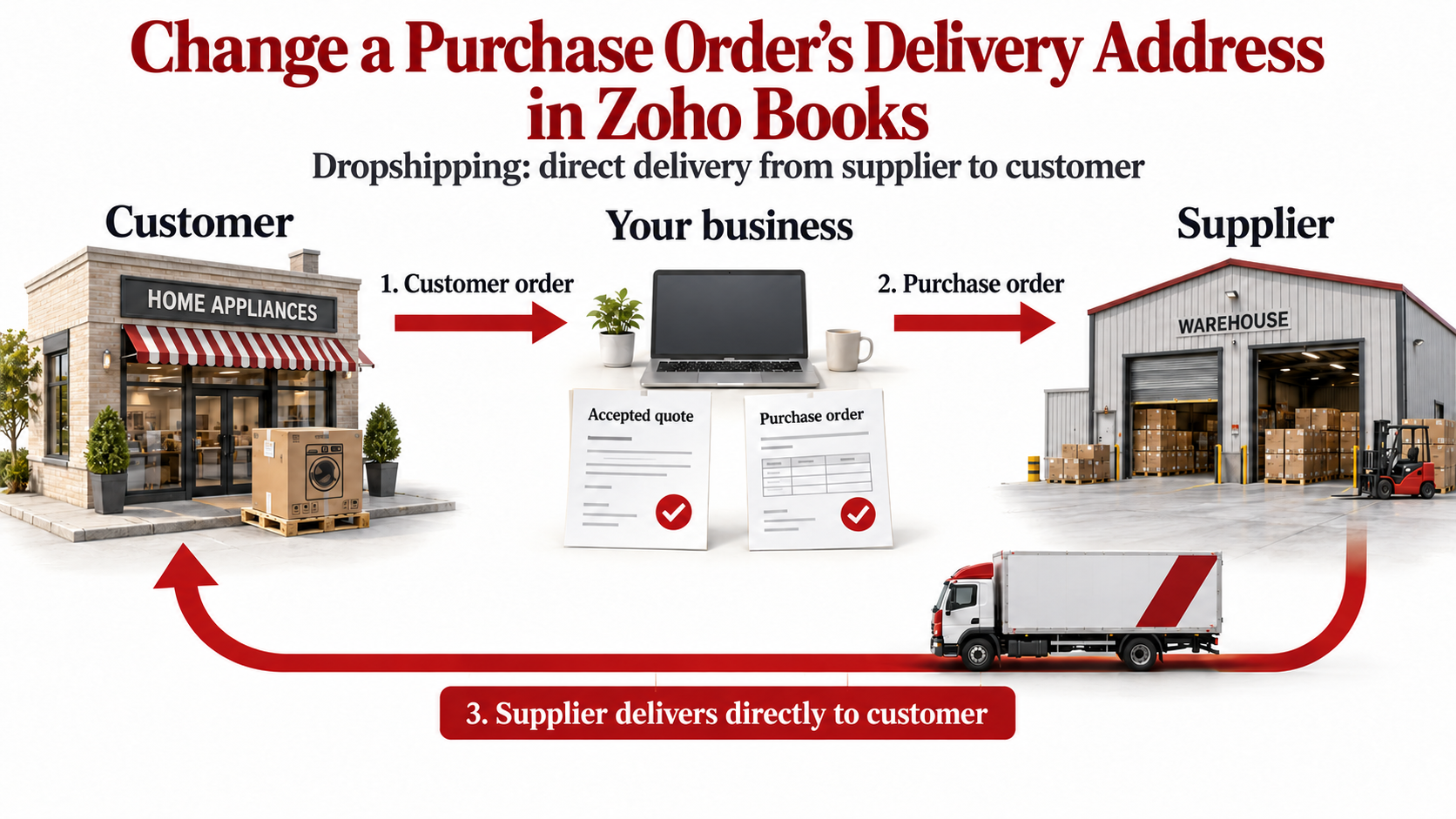
This is particularly useful for dropshipping heavy items. The customer orders from us, we raise a purchase order with the supplier, and the supplier delivers directly to the customer's premises or job site. The goods do not need to travel to our own premises first.
A quote may contain products from several suppliers, so each supplier needs a purchase order containing only their own items. The purchase order also needs our buying price, rather than the price we charged the customer.
I previously encountered the error covered in my article about the shipping address exceeding 100 characters:
Please ensure that the shipping_address has less than 100 characters.
In my purchase-order function, this happened when I included the shipping-address map while creating the order. The separate shipping-address endpoint used in the sales-order workaround was not available for this purchase-order workflow. Creating the purchase order first, then assigning a saved address by ID, worked.
There are two separate records involved: the vendor supplies the goods; the customer receives the delivery. The purchase order's vendor_id remains the supplier's Books ID. The delivery fields identify the customer and the address where the goods should go.
How?
The following extracts show the important parts of my button function. They retain the working Books requests and delivery fields, with placeholder identifiers and a few additional checks. They are sections to use alongside the existing item/vendor lookup and creation code, rather than a complete replacement function.
-
Prepare the quote and its line items.
I added these fields to the Quote line items:
- Supplier: a lookup to the CRM Vendors module, identifying who will supply that particular item.
- Cost Price: the price we pay the supplier. This becomes the purchase-order line's
ratein Books. - Request from Supplier: a status field. The function processes lines set to
Raise POand changes successfully processed lines toPO Generated.
The API names in my setup are
Quoted_Items,Supplier,Cost_PriceandRequest_from_Supplier. Adjust these to match your own fields.The button passes the Quote ID into
p_QuoteId. Retrieve the quote and check its stage before creating anything:v_BooksOrgId = "YOUR_ORGANIZATION_ID"; v_BooksApiDomain = "https://www.zohoapis.eu"; v_CrmApiDomain = "https://www.zohoapis.eu"; v_BooksAppDomain = "https://books.zoho.eu"; r_Quote = invokeurl [ url :v_CrmApiDomain + "/crm/v8/Quotes/" + p_QuoteId type :GET connection:"crm_connection" ]; l_Data = ifnull(r_Quote.get("data"),List()); if(l_Data.size() == 0) { return "No purchase orders were created :: Quote could not be retrieved."; } m_Quote = l_Data.get(0); if(ifnull(m_Quote.get("Quote_Stage"),"") != "Accepted") { return "No purchase orders were created :: This quote must first be Accepted."; }These examples use the EU domains. Use your own data centre, organisation ID and authorised CRM/Books connections. The customer-import section assumes that the relevant CRM and Books organisations are connected.
-
Group the eligible lines by supplier and use the cost price.
Process a line only when its status is
Raise POand its Supplier lookup is populated. Keep the supplier IDs unique so that two lines from the same supplier produce one purchase order containing both lines.// Initialise once, before processing the quote lines. l_SupplierIDs = List(); m_ZB_PO_LineItems = Map(); m_ZB_VendorIDs = Map(); // Inside the eligible-line branch of your existing loop: v_ZCrmSupplierID = m_QuoteItem.get("Supplier").get("id").toString(); if(!l_SupplierIDs.contains(v_ZCrmSupplierID)) { l_SupplierIDs.add(v_ZCrmSupplierID); } // The existing lookup/create code must supply these Books IDs: // v_ZB_ItemID = this product's Books item_id. // v_ZB_VendorID = this supplier's Books contact_id. if(m_QuoteItem.get("Cost_Price") == null) { return "A selected quote line is missing its Cost Price."; } v_CostPrice = m_QuoteItem.get("Cost_Price").toDecimal(); m_ZB_POLineItem = Map(); m_ZB_POLineItem.put("item_id",v_ZB_ItemID); m_ZB_POLineItem.put("rate",v_CostPrice); m_ZB_POLineItem.put("quantity",m_QuoteItem.get("Quantity")); l_SupplierItems = ifnull(m_ZB_PO_LineItems.get(v_ZCrmSupplierID),List()); l_SupplierItems.add(m_ZB_POLineItem); m_ZB_PO_LineItems.put(v_ZCrmSupplierID,l_SupplierItems); m_ZB_VendorIDs.put(v_ZCrmSupplierID,v_ZB_VendorID);In my function, the item lookup searches Books using
zcrm_product_id. If the item is missing, it creates a Books item with the product name, SKU, description anditem_typeset tosales_and_purchases. The returneditem_idis saved to the CRM Product'sBooks_Item_IDfield.The supplier lookup searches Books contacts using
zcrm_vendor_id. If necessary, it creates a Books contact withcontact_typeset tovendor, using the CRM Vendor's details. Itscontact_idis saved to the CRM Vendor'sBooks_IDfield.Reuse those saved Books IDs on later runs. Creating a Books item or vendor directly does not, by itself, establish the CRM link used by the search filters. Validate each resolved ID, the quantity and the cost price before adding the line; a missing cost price should not silently become a free item.
Also retain the original Quote line IDs, grouped by supplier. These identify the lines to mark as
PO Generatedonce that supplier's orders have been created successfully. -
Find the Books customer, or import the CRM Account or Contact immediately.
The delivery address must belong to a Books customer. My function prefers the Quote's Account when one is present; otherwise, it uses the Contact. It searches for the existing CRM link before importing anything.
v_ZB_CustomerID = "";
v_CrmCustomerID = "";
v_CrmCustomerType = "";
m_ZB_SearchParams = Map();

if(m_Quote.get("Account_Name") != null)
{
    v_CrmCustomerID = m_Quote.get("Account_Name").get("id").toString();
    v_CrmCustomerType = "account";
    m_ZB_SearchParams.put("zcrm_account_id",v_CrmCustomerID);
}
else if(m_Quote.get("Contact_Name") != null)
{
    v_CrmCustomerID = m_Quote.get("Contact_Name").get("id").toString();
    v_CrmCustomerType = "contact";
    m_ZB_SearchParams.put("zcrm_contact_id",v_CrmCustomerID);
}
else
{
    return "No purchase orders were created :: The quote needs an Account or Contact.";
}

r_ZB_CustomerSearch = invokeurl
[
    url :v_BooksApiDomain + "/books/v3/contacts?organization_id=" + v_BooksOrgId
    type :GET
    parameters:m_ZB_SearchParams
    connection:"books_connection"
];
if(r_ZB_CustomerSearch.get("code") == 0)
{
    l_ZB_Customers = ifnull(r_ZB_CustomerSearch.get("contacts"),List());
    if(l_ZB_Customers.size() > 1)
    {
        return "More than one Books customer matched :: Check the CRM link before continuing.";
    }
    if(l_ZB_Customers.size() == 1)
    {
        v_ZB_CustomerID = ifnull(l_ZB_Customers.get(0).get("contact_id"),"").toString();
    }
}
else
{
    // Retain the original function's fallback to the CRM import route.
    info "Customer lookup failed :: " + r_ZB_CustomerSearch.toString();
}

// A successful search can still return no matching customers.
if(v_ZB_CustomerID == "")
{
    v_ImportUrl = v_BooksApiDomain + "/books/v3/crm/" + v_CrmCustomerType + "/" + v_CrmCustomerID + "/import?organization_id=" + v_BooksOrgId;
    r_ZB_CustomerImport = invokeurl
    [
        url :v_ImportUrl
        type :POST
        connection:"books_connection"
    ];
    if(r_ZB_CustomerImport.get("code") != 0)
    {
        return "Books customer import failed :: " + r_ZB_CustomerImport.toString();
    }
    m_ImportedCustomer = ifnull(r_ZB_CustomerImport.get("data"),Map());
    v_ZB_CustomerID = ifnull(m_ImportedCustomer.get("contact_id"),"").toString();
}
if(v_ZB_CustomerID == "")
{
    return "No purchase orders were created :: Books did not return a customer ID.";
}
The two import routes used here are
/books/v3/crm/account/{CRM_ACCOUNT_ID}/importand/books/v3/crm/contact/{CRM_CONTACT_ID}/import. The returned Books customer ID comes fromdata.contact_id.Check for an empty result after a successful search. An empty
contactslist means there was no match; it does not necessarily mean the search returned an error. This extract also retains my original function's import fallback if the lookup fails; the lookup response is logged so that a failed request can be investigated separately. -
Choose the delivery destination and build the address map.
In my setup, the Quote's shipping address takes priority. If it has no shipping street or postcode and a Job is linked, the function checks the Job:
- For a
SUB-CONTRACTORjob, it uses the linked subcontractor Contact's mailing address. - For other jobs, it tries the linked Site address. If that branch still has no postcode, it tries the Account's shipping address.
My Job is a renamed CRM Sales Order, so its API module name is
Sales_Orders.Sitesis a custom module. These lookups and address fields are specific to my CRM setup.Once the destination has been chosen, the Books address map is:
// These variables contain the selected Quote, Job/Site or Contact address.
// Attention and phone contain the delivery contact's details, where available.
m_ZB_POShipping = Map();
m_ZB_POShipping.put("attention",v_ZB_Attention);
m_ZB_POShipping.put("phone",v_ZB_Phone);
m_ZB_POShipping.put("address",v_Shipping_Address1);
m_ZB_POShipping.put("street2",v_Shipping_Address2);
m_ZB_POShipping.put("city",v_Shipping_City);
m_ZB_POShipping.put("state",v_Shipping_State);
m_ZB_POShipping.put("zip",v_Shipping_Zip);
m_ZB_POShipping.put("country",v_Shipping_Country);
The customer importing step identifies who the address belongs to; the delivery contact identifies who should receive the goods. Keep these separate, particularly when an Account is the customer and a Contact or subcontractor is receiving the delivery.
Check that the selected address contains the details needed for delivery before continuing. A map containing eight empty values still has eight keys, so checking
m_ZB_POShipping.size()alone does not validate an address. - For a
-
Create each supplier's purchase order, add the customer address, then assign its ID.
Create the Books purchase order without a
shipping_addressmap. The important delivery requests are then:POST /books/v3/contacts/{BOOKS_CUSTOMER_ID}/addressto add the address to the customer.- Capture
address_info.address_idfrom the response. PUT /books/v3/purchaseorders/{PURCHASEORDER_ID}withdelivery_customer_idanddelivery_customer_address_id.
The extract below uses the supplier maps built earlier. Because all these orders share the same customer and destination, it creates the customer address once during this run and reuses its ID for the remaining suppliers.
v_CustomerAddressID = "";

for each v_ZCrmSupplierID in l_SupplierIDs
{
    v_ZB_VendorID = ifnull(m_ZB_VendorIDs.get(v_ZCrmSupplierID),"").toString();
    if(v_ZB_VendorID == "")
    {
        return "No Books vendor ID was resolved for supplier " + v_ZCrmSupplierID;
    }

    m_ZB_PO = Map();
    m_ZB_PO.put("date",zoho.currentdate.toString("yyyy-MM-dd"));
    m_ZB_PO.put("vendor_id",v_ZB_VendorID);
    m_ZB_PO.put("line_items",m_ZB_PO_LineItems.get(v_ZCrmSupplierID));
    m_ZB_PO.put("is_update_customer",false);

    r_ZB_PO = zoho.books.createRecord("purchaseorders",v_BooksOrgId,m_ZB_PO,"books_connection");
    if(r_ZB_PO.get("code") != 0)
    {
        return "Books purchase order creation failed :: " + r_ZB_PO.toString();
    }
    m_CreatedPO = ifnull(r_ZB_PO.get("purchaseorder"),Map());
    v_ZB_PO_ID = ifnull(m_CreatedPO.get("purchaseorder_id"),"").toString();
    v_ZB_PO_Ref = ifnull(m_CreatedPO.get("purchaseorder_number"),"").toString();
    if(v_ZB_PO_ID == "")
    {
        return "Books did not return a purchase order ID.";
    }

    if(v_CustomerAddressID == "")
    {
        r_CreateCustomerAddress = invokeurl
        [
            url :v_BooksApiDomain + "/books/v3/contacts/" + v_ZB_CustomerID + "/address?organization_id=" + v_BooksOrgId
            type :POST
            parameters:m_ZB_POShipping.toString()
            connection:"books_connection"
        ];
        if(r_CreateCustomerAddress.get("code") != 0)
        {
            return "Purchase order " + v_ZB_PO_Ref + " exists, but its customer address could not be added :: " + r_CreateCustomerAddress.toString();
        }
        m_AddressInfo = ifnull(r_CreateCustomerAddress.get("address_info"),Map());
        v_CustomerAddressID = ifnull(m_AddressInfo.get("address_id"),"").toString();
        if(v_CustomerAddressID == "")
        {
            return "Purchase order " + v_ZB_PO_Ref + " exists, but Books returned no address ID.";
        }
    }

    m_ZB_UpdatePO = Map();
    m_ZB_UpdatePO.put("delivery_customer_id",v_ZB_CustomerID);
    m_ZB_UpdatePO.put("delivery_customer_address_id",v_CustomerAddressID);
    m_ZB_UpdatePO.put("is_one_off_address",true);
    m_ZB_UpdatePO.put("is_update_customer",false);

    r_UpdatePO = invokeurl
    [
        url :v_BooksApiDomain + "/books/v3/purchaseorders/" + v_ZB_PO_ID + "?organization_id=" + v_BooksOrgId
        type :PUT
        parameters:m_ZB_UpdatePO.toString()
        connection:"books_connection"
    ];
    if(r_UpdatePO.get("code") != 0)
    {
        return "Purchase order " + v_ZB_PO_Ref + " exists, but its delivery update failed :: " + r_UpdatePO.toString();
    }

    // Create the matching CRM purchase order here, after the delivery update succeeds.
    // Retain this supplier's successful result before proceeding to the next supplier.
}
The detail that made this work:
delivery_customer_idis the Books customer ID, anddelivery_customer_address_idis the address ID returned when adding the address to that customer. Neither is the CRM record ID, and neither is the vendor ID.I retained
is_one_off_address = trueandis_update_customer = falsefrom my working request. The separate addressPOSTstill creates an address on the customer; the one-off flag should not be taken to mean that the saved address disappears afterwards. -
Create the matching CRM purchase order and update the processed quote lines.
After the Books order and its delivery update succeed, my function creates a CRM Purchase Order through
POST /crm/v8/Purchase_Orders. The Bookspurchaseorder_numberbecomes both the CRMSubjectand my customPO_Reference.Within the supplier loop, its payload follows this structure.
m_ZCrm_POShippingcontains the selected address mapped to CRM shipping fields, andm_ZCrm_PO_LineItemscontains the CRM product lines grouped by supplier.m_ZCrm_PO = Map(); m_ZCrm_PO.putAll(m_ZCrm_POShipping); m_ZCrm_PO.put("Subject",v_ZB_PO_Ref); m_ZCrm_PO.put("PO_Reference",v_ZB_PO_Ref); m_ZCrm_PO.put("Vendor_Name",v_ZCrmSupplierID); m_ZCrm_PO.put("Purchase_Items",m_ZCrm_PO_LineItems.get(v_ZCrmSupplierID)); m_ZCrm_PO.put("Status","Created"); m_ZCrm_PO.put("Books_ID",v_ZB_PO_ID); m_ZCrm_PO.put("Books_URL",v_BooksAppDomain + "/app/" + v_BooksOrgId + "#/purchaseorders/" + v_ZB_PO_ID); if(m_Quote.get("Job") != null) { m_ZCrm_PO.put("Job",m_Quote.get("Job").get("id")); } l_RecordsToSend = List(); l_RecordsToSend.add(m_ZCrm_PO); m_Data = Map(); m_Data.put("data",l_RecordsToSend); m_Data.put("trigger",List()); r_CreateCrmPO = invokeurl [ url :v_CrmApiDomain + "/crm/v8/Purchase_Orders" type :POST parameters:m_Data.toString() connection:"crm_connection" ]; info r_CreateCrmPO;The corresponding CRM line items use
Product_Name,Description,QuantityandList_Price. Set that purchase-orderList_Priceto the Quote line's Cost Price, just as the Books line uses it forrate.Check the CRM record's creation result before marking that supplier's Quote lines as
PO Generated. Track success per supplier, so a failed supplier does not cause its unprocessed lines to be marked complete.My original function attempts to change the Quote stage to
Purchase Order Sent. However, these requests create the orders; they do not send them to the suppliers. Use a stage that matches your process, and reserve a sent status for when sending has actually happened.
Keeping the original organisation-address method
The earlier approach is still useful when the destination should be an address belonging to your own organisation, such as your warehouse or office. Create the address under the organisation, then use its ID as delivery_org_address_id on the existing purchase order:
// Alternative to the customer-address delivery update above.
// v_ZB_PO_ID must identify an existing Books purchase order.
m_OrgDeliveryAddress = Map();
m_OrgDeliveryAddress.put("address",v_Shipping_Address1);
m_OrgDeliveryAddress.put("street2",v_Shipping_Address2);
m_OrgDeliveryAddress.put("city",v_Shipping_City);
m_OrgDeliveryAddress.put("state",v_Shipping_State);
m_OrgDeliveryAddress.put("zip",v_Shipping_Zip);
m_OrgDeliveryAddress.put("country",v_Shipping_Country);

r_CreateOrgAddress = invokeurl
[
    url :v_BooksApiDomain + "/books/v3/organizations/address?organization_id=" + v_BooksOrgId
    type :POST
    parameters:m_OrgDeliveryAddress.toString()
    headers:{"Content-Type":"application/json"}
    connection:"books_connection"
];
m_OrgAddress = ifnull(r_CreateOrgAddress.get("organization_address"),Map());
v_OrgAddressID = ifnull(m_OrgAddress.get("organization_address_id"),"").toString();
if(r_CreateOrgAddress.get("code") != 0 || v_OrgAddressID == "")
{
    return "Organisation address creation failed :: " + r_CreateOrgAddress.toString();
}

m_ZB_UpdatePO = Map();
m_ZB_UpdatePO.put("delivery_org_address_id",v_OrgAddressID);
m_ZB_UpdatePO.put("is_one_off_address",true);
m_ZB_UpdatePO.put("is_update_customer",false);

r_UpdatePO = invokeurl
[
    url :v_BooksApiDomain + "/books/v3/purchaseorders/" + v_ZB_PO_ID + "?organization_id=" + v_BooksOrgId
    type :PUT
    parameters:m_ZB_UpdatePO.toString()
    connection:"books_connection"
];
info r_UpdatePO;
For this route, the response supplies organization_address.organization_address_id, while the purchase-order update uses delivery_org_address_id. For the customer route, the response supplies address_info.address_id, while the update uses delivery_customer_address_id together with delivery_customer_id. Choose the appropriate route for the delivery destination.
A few practical points
- Each address-creation
POSTadds another address. Reuse a suitable saved address ID on later runs rather than repeatedly adding the same destination. - The examples reuse one customer address across suppliers only because those orders share a destination. If different items go to different sites, group them by both supplier and destination.
- A delivery update or CRM creation can fail after a Books purchase order already exists. Retain its ID and repair that order on a retry, rather than creating another one.
- Confirm the vendor, cost prices and delivery address on a sample purchase order before sending it. The result should be a supplier-specific order addressed to the customer's delivery location.
Discussion
Comments
Questions, corrections and useful additions are reviewed before appearing here.
Discussion Newest first
No comments yet. Start the discussion.