
A super quick article on getting the business hours set in ZohoCRM.
Why?
When creating a booking system in ZohoCreator, I want to enter the default working shift for an employee either existing or that has been added to the system based on the business hours set at the organization level in ZohoCRM.
How?
Using an invokeURL, the key here is you'll find them in the settings; so check that your connection has the scope to access both Organization details (ZohoCRM.org.READ is enough - perhaps optional) and access to Settings (ZohoCRM.settings.READ). I'm calling mine "mycrmconnection".
	r_OrgDetails = invokeUrl
    [
    	url: "https://www.zohoapis.com/crm/v3/settings/business_hours"
    	type: GET
    	connection: "mycrmconnection"
    ];
	info r_OrgDetails;
Yields something like
{
  "business_hours": {
    "business_days": [
      "Monday",
      "Tuesday",
      "Wednesday",
      "Thursday",
      "Friday",
      "Saturday"
    ],
    "custom_timing": [
      {
        "days": "Monday",
        "business_timing": [
          "7:00",
          "18:00"
        ]
      },
      {
        "days": "Thursday",
        "business_timing": [
          "7:00",
          "18:00"
        ]
      },
      {
        "days": "Friday",
        "business_timing": [
          "7:00",
          "18:00"
        ]
      },
      {
        "days": "Wednesday",
        "business_timing": [
          "7:00",
          "18:00"
        ]
      },
      {
        "days": "Tuesday",
        "business_timing": [
          "7:00",
          "18:00"
        ]
      },
      {
        "days": "Saturday",
        "business_timing": [
          "09:00",
          "15:00"
        ]
      }
    ],
    "daily_timing": null,
    "week_starts_on": "Monday",
    "same_as_everyday": false,
    "id": "123456789000000123456789",
    "type": "custom"
  }
}
Tidied Up
Want that in a practical format for use in ZohoCreator? Preferably not in the Zoho order, but that of the normal week (in other words, not alphabetical, numerical, or completely random order):
void JoelLipman.fn_SetStaffUsualShift()
{
	//
	// build a standard usual shift subform from CRM
	r_OrgDetails = invokeUrl
    [
    	url: "https://www.zohoapis.com/crm/v3/settings/business_hours"
    	type: GET
    	connection: "mycrmconnection"
    ];
	m_OrgDetails = ifnull(r_OrgDetails.get("business_hours"),{});
	if(m_OrgDetails.get("business_days") != null)
	{
		//
		// let's format a little as the business days are given in the correct order
		m_ShiftRow = Map();
		m_ShiftRow.put("open","00:00");
		m_ShiftRow.put("close","00:00");
		m_ShiftBuildUp = Map();
		l_DaysCorrectOrder = m_OrgDetails.get("business_days");
		for each v_Day in l_DaysCorrectOrder
		{
			m_ShiftBuildUp.put(v_Day, m_ShiftRow);
		}
		//
		// ok let's get the opening times
		if(m_OrgDetails.get("custom_timing") != null)
		{
			l_CustomTimings = m_OrgDetails.get("custom_timing");
			for each r_Timing in l_CustomTimings
            {
				if(r_Timing.get("days") != null)
				{
					v_Day = r_Timing.get("days");
					if(m_ShiftBuildUp.get(v_Day) != null)
					{
						l_Timings = r_Timing.get("business_timing");
						m_ShiftRow = Map();
						if(l_Timings.size()>0)
						{
							v_OpenTime = l_Timings.get(0);
							m_ShiftRow.put("open",v_OpenTime);
						}
						if(l_Timings.size()>1)
						{
							v_CloseTime = l_Timings.get(1);
							m_ShiftRow.put("close",v_CloseTime);
						}
						m_ShiftBuildUp.put(v_Day, m_ShiftRow);
					}
				}
            }
		}
	}
	info m_ShiftBuildUp;
}{
"Monday": {
"open": "7:00",
"close": "18:00"
},
"Tuesday": {
"open": "7:00",
"close": "18:00"
},
"Wednesday": {
"open": "7:00",
"close": "18:00"
},
"Thursday": {
"open": "7:00",
"close": "18:00"
},
"Friday": {
"open": "7:00",
"close": "18:00"
},
"Saturday": {
"open": "09:00",
"close": "15:00"
}
}Inserting as a subform on the employee record
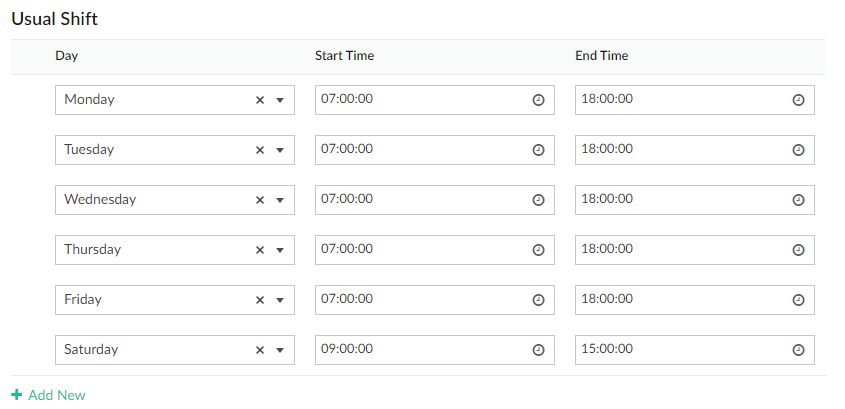
So now we just need to append the following code which loops through the map / associative array we just created and shove this onto every employee's record. My employee record form is called "Staff" and the subform is called "Usual Shift" containing the columns "Day", "Start Time", and "End Time":
	//
	// select applicable staff
	l_ApplicableStaff = Staff[ID != 0];
	for each c_Employee in l_ApplicableStaff
    {
		info c_Employee.Name;
		//
		// reset the stuff they already have in their subform "Usual Shift"
		c_Employee.Usual_Shift.clear();
		//
		// great now let's build a ZohoCreator subform
		c_UsualShift = Collection();
		for each v_WorkDay in m_ShiftBuildUp.keys()
		{
			info v_WorkDay;
			//
			// format the opening time and closing time
			v_StartTime = zoho.currenttime.toString("yyyy-MM-dd ") + m_ShiftBuildUp.get(v_WorkDay).get("open").leftpad(5).replaceAll(" ", "0") + ":00";
			v_FinishTime = zoho.currenttime.toString("yyyy-MM-dd ") + m_ShiftBuildUp.get(v_WorkDay).get("close").leftpad(5).replaceAll(" ", "0") + ":00";
			//
			row_Shift = Staff.Usual_Shift();
			row_Shift.Day = v_WorkDay;
			row_Shift.Start_Time = v_StartTime.toTime();
			row_Shift.End_Time = v_FinishTime.toTime();
			c_UsualShift.insert(row_Shift);
		}
		c_Employee.Usual_Shift.insert(c_UsualShift);
		info "-------------";
} 
Error(s) Encountered
- Value is empty and '1234567000001234567' function cannot be applied: Possibly due to me trying to create and declare the subform before having specified any record to insert it into.
- Expecting ZC_SUBFORM_109 expression found COLLECTION expression: I may have tried to make a subform equal the collection rather than inserting the collection into the subform using insert().
- Invalid update task found corresponding properties: Trying to update a time field with a string is a no go. Set it to an atom time or nice SQL date/time (eg. "yyyy-MM-dd HH:mm:ss") and then apply the function .toTime()
Source(s)
- Zoho CRM v3 Organization API
- Zoho Community Forums - CRM Business Hours through the API/Deluge
- Trial and Error
Discussion
Comments
Questions, corrections and useful additions are reviewed before appearing here.
Discussion Newest first
No comments yet. Start the discussion.