
This is a very quick article with examples of managing a multi-user or multi-lookup field in CRM using Zoho Deluge.
Why?
Sometimes you might need this when data mapping fields from one module to another, sometimes you need to manage existing multi-lookups/users in a record.
How?
So the key point to remember is that all multi-select lookup and multi-user lookup fields are held in temporary CRM modules called a "LinkingModule" (as opposed to standard modules and custom modules).
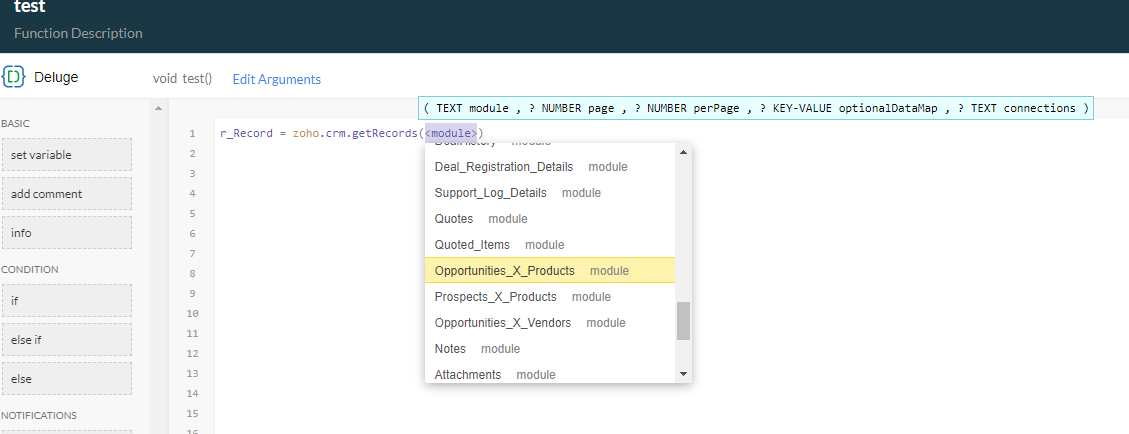
Quick way to determine the API name of the linking module:
- Go to setup > Developer Space > functions.
- Create a standalone function called "Test".
- Type in line 1: r_Record = zoho.crm.getRecords
- then press Enter (DO NOT START TYPING FOR A MODULE NAME - LET THE SYSTEM POPUP YOUR OPTIONS AS PER THE FOLLOWING SCREENSHOT - USE ARROW KEYS OR MOUSE):
Find records relevant to this module:
l_LinkedRecords = zoho.crm.searchRecords("Opportunities_X_Products","(Opportunity:equals:" + v_DealID + ")");Find records relevant to this user:
v_SearchCriteria = "(field0:equals:" + v_UserID + ")";
l_SearchResults = zoho.crm.searchRecords("Vendors_X_Users",v_SearchCriteria);
Code to Add a value to a multi-lookup (on Create Record):
// sample code when creating a record in a module that contains a lookup
m_Create = Map();
m_Create.put("Name","Joels Amazing Test");
r_Create = zoho.crm.createRecord("Tests", m_Create);

// now take the ID that was created and use the following code to populate the multi-lookup field
if(!isnull(r_Create.get("id")))
{
    m_Link = Map();

    // using record IDs cos there's nothing better
    m_Link.put("Test",r_Create.get("id"));

    // using record IDs cos there's nothing better
    m_Link.put("Joel",123456789012345678);

    // create link
    r_Link = zoho.crm.createRecord("Tests_X_Contacts", m_Link);
}
Code to Add a value to a multi-lookup (on Update Record):
v_DealID = ifnull(input.p_DealID,0);
if(v_DealID != 0)
{
    m_Link = Map();
    m_Link.put("Deal", v_DealID);
    m_Link.put("Product", 123456789012345678);
    r_Link = zoho.crm.createRecord("Deals_X_Products", m_Link);
}
Code to Delete a value from a multi-lookup:
v_ID2Delete = 123456789012345678;
v_SearchCriteria = "(field0:equals:" + v_myRecordID + ")";
l_SearchResults = zoho.crm.searchRecords("Tests_X_Users",v_SearchCriteria);
for each  r_Link in l_SearchResults
{
    if(!isnull(r_Link.get("id")) && r_Link.get("Test").get("id")==v_ID2Delete)
    {
        m_Delete = Map();
        m_Delete.put("module","Tests_X_Users");
        m_Delete.put("id",r_Link.get("id"));
        r_Delete = zoho.crm.invokeConnector("crm.delete", m_Delete);
    }
}
Update 2025
Having to do this again in 2025 and things seem to have changed. I've added a multi-user lookup on the quotes record called "Requires_Approval_Users". A quick setup method is now to use the CRM interface to add a couple of users to the field and then save the changes. I now query all the records held so far in this linking module which I'm guessing is called Quotes_X_Users (would appear in the popup once you start typing zoho.crm.getRecords. I'll get an array back of 2 records and I'll be looking for the 2 lookup fields (contains an ID and name) per record. In my case:
..
"Requires_Approval_Users":{
     "name":"Joel Lipman",
     "id":"12345600000987654"
},
...

AND

..
"userlookup221_2":{
     "name":"Another Joel",
     "id":"12345600000987653"
},
...m_AssociateMultiUserLookup = {"data":[{"id":p_QuoteID, "Requires_Approval_Users":[{"Requires_Approval_Users":{"id":m_ApprovalUser.get("id")}}]}]};
r_AssociateMultiUserLookup = invokeurl
[
url: "https://www.zohoapis.eu/crm/v8/Quotes"
type: PUT
parameters: m_AssociateMultiUserLookup.toString()
connection: "my_crm_connection"
];
info "Response from associating user " + _ApprovalUser.get("id");
info r_AssociateMultiUserLookup;//
// used for checking api names and the linking module (not visible via the interface)
v_Endpoint = "https://www.zohoapis.com/crm/v8/settings/fields?module=Quotes_X_Users";
r_MetaData = invokeurl
[
url: v_Endpoint2
type: GET
connection:"my_crm_connection"
];
info r_MetaData;
//
// I can see 2 api names for lookups
// userlookup221_2
// Requires_Approval_Users //
// loop through users to find the approver
for each m_User in l_Users
{
if(m_User.get("Job_Title").equalsIgnoreCase("CFO"))
{
l_ApprovalUsers.add(m_User.get("id"));
}
}
//
// check list of IDs
if(l_ApprovalUsers.size() > 0)
{
//
// reset multi-user lookup field (clear out values)
v_SearchCriteria = "(userlookup221_2:equals:" + p_QuoteID + ")";
l_SearchResults = zoho.crm.searchRecords("Quotes_X_Users",v_SearchCriteria);
info l_SearchResults;
for each m_DeleteResult in l_SearchResults
{
if(!isNull(m_DeleteResult.get("id")))
{
m_Delete = Map();
m_Delete.put("module","Quotes_X_Users");
m_Delete.put("id",m_DeleteResult.get("id"));
r_Delete = zoho.crm.invokeConnector("crm.delete",m_Delete);
info "Deleted record " + m_DeleteResult.get("id");
}
}
//
// update linking module
for each v_ApprovalUserID in l_ApprovalUsers
{
m_AssociateMultiUserLookup = {"data":{{"id":p_QuoteID,"Requires_Approval_Users":{{"Requires_Approval_Users":{"id":v_ApprovalUserID}}}}}};
r_AssociateMultiUserLookup = invokeurl
[
url :"https://www.zohoapis.com/crm/v8/Quotes"
type :PUT
parameters:m_AssociateMultiUserLookup.toString()
connection:"my_crm_connection"
];
info "Response from associating user " + v_ApprovalUserID;
info r_AssociateMultiUserLookup;
}
}
Discussion
Comments
Questions, corrections and useful additions are reviewed before appearing here.
Discussion Newest first
No comments yet. Start the discussion.