


Zoho Creator: Prevent Endless Loops On User Input of a Field
- Category: Zoho Creator
- Hits: 60773
This article serves as a best practice and reminder to myself on how to stop endless loops from happening in Creator and crashing the application. This is more for complex Creator forms which have workflows triggered from many deltas/changes.
Why?
Some clients have referred to this as the "spinning circle of death": they load up a Creator application or change a field and there will be a spinning icon indicating that the field has triggered an automation/workflow but it keeps spinning and doesn't stop. The app page will ultimately timeout and when reloading the form it simply displays a blank page. Their only workaround is wait about 30 seconds or more for the loop to automatically cut out and then they can use the interface again only to find it may crash again.

In the background and from a developers understanding: field1 is told to update field2 when field1 is changed. When field2 is changed, it is told to update field1. This causes a recursive or endless loop where each field triggers an workflow/automation, even if the value has not changed, to modify another field and vice-versa. This can get more complex when there are a lot of fields in the mix.
How?
I'm using this article to go through various methods I tried to prevent this from happening:

Zoho Creator: Push to eBay Listings
- Category: Zoho Creator
- Hits: 6953
This is an article to document how I connect a Zoho Creator app to push a product to your eBay listings. By writing this article, I can refine this method as it took me a while to figure out.
Why?
I have a client who has a Zoho Creator app and wants to push their products to their eBay account. Previously using Zoho Inventory, we realized that this only syncs 1 way not 2 as per the documentation. In that items sold on eBay sync to Zoho Inventory by means of an eBay Sales Order, and only every 4 hours. We needed something that pushes out to eBay and updates the eBay listing. To complicate matters, the client also uses Shopify which means that when an item is sold by eBay, it would take 4 hours until all systems were aware. 1 customer buying the item off eBay and another customer buying the same item off Shopify would be problematic if the client only has 1 of the item in stock. See my Shopify article to get a webhook response within 5 seconds.
How?
At the time of print, the Trading API of eBay is deprecated and reaches end of life at the end of this year (2021). In this demonstration, we're going to use the Listings API, follow the OAuth 2.0 process to get an access token and use it to create an eBay listing.

Zoho Creator: Two submit buttons on a non-stateless form with 2 different redirects
- Category: Zoho Creator
- Hits: 41808
This is an article to document how to have two submit buttons on a non-stateless form which both submit the form but one leaves the current record open while the other redirects to the reports view.
Why?
A client wanted a "Save" button on their form as well as a "Save & Close" button. The "Save" button would submit the form but keep the user on the record form. The "Save & Close" button would submit the form and then redirect the user to the report view of the records.
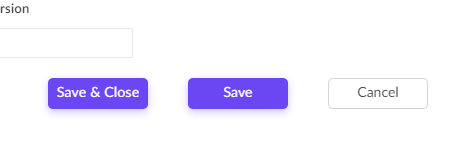
Sounds simple but you can only set a form to redirect to one link and adding a HTML anchor link (<a href>) to the page won't help as you need to submit the form before redirecting the user. A HTML <input type=submit> element to the page won't help either as you need to redirect the user to the specified report after submitting the form.
How?
Well as always, I'm going to cheat. My solution here was to simply repurpose a decision box field in Creator; then re-style it to look like a button; then add a workflow on click of this field.

Zoho Creator: Assign an integration field value with an integration value
- Category: Zoho Creator
- Hits: 18495
This is a quick article to help anyone encountering this gotcha: I have an integration field, if someone changes it, I want to save the value to the record immediately.
Why?
If you try to update an integration field via deluge with another integration field or even the same integration field, it will return an error
Unable to update the value to r_RecordDetails.Account. Line:(442)
How?
It is written in the documentation albeit difficult to find: an integration field returns an ID as a string. If you want to assign it to an integration field, you have to convert it to a number with .toLong().

Zoho CRM & Zoho Creator: Query returns some fields missing other data on the record
- Category: Zoho Creator
- Hits: 21796
A super quick article to demonstrate how an idiot like myself can misread the documentation. This particular article shows you how to customize the search results or response from using zoho.creator.getRecordById().
Why?
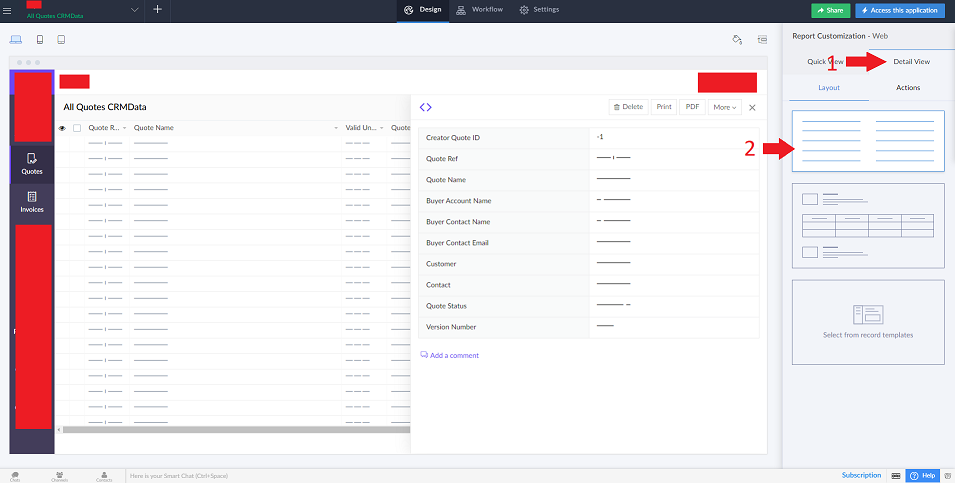
My use case scenario is that I was trying to build a related list in Zoho CRM with a view on to related records in Zoho Creator. For some reason, only some random fields were being returned, all pretty much useless to me. Well the "for some reason" turned out to be because my detail view on the report was displaying a report/document template.
How?
The quick answer is:
Add the fields you want to the detail view of the report you are accessing.
Zoho Creator: Receive JSON via a Shopify Webhook
- Category: Zoho Creator
- Hits: 54362
This is an article to document how to receive a JSON response from a webhook created in Shopify. See my article: Zoho Deluge: Push Item to Shopify API if you want information on setting up an integration from Zoho Creator to Shopify API.
Why?
In this example, we want a webhook that whenever an order is made in Shopify, it tells our Zoho Creator app. Note that at the time of this article, API v1 is deprecated (so no authtokens) and API OAuth2.0 is in full swing... we're still going to cheat.
How?
1,2,3 steps really. First we're going to set up a Creator form to receive the JSON. Secondly, we'll create the endpoint URL for the webhook. And thirdly, we'll create the Shopify webhook.
Zoho Creator: Add a subform while creating a record
- Category: Zoho Creator
- Hits: 31228
This is an article to document how to include a subform and rows while you are creating a record containing the subform.
Why?
The use case here is for a Quote Builder in Zoho Creator: Create a quote record and include a subform containing the line items. You may have tried code where you add a record first and then add the subform afterwards (insert into <form>[...]) but it can be done all in one go.
How?
Here's a use case example which you will need to adapt to your own but It should do enough (spacing has been added for demo purposes and to make it clearer).
Zoho Creator: Download File from ZohoCRM field type "File Upload" (not attachments)
- Category: Zoho Creator
- Hits: 46019
This is an article to demo some Deluge code on how to download a file that was uploaded in CRM in a custom module in field that was of type "File Upload".
Why?
Just to remind me where I went wrong, I have a client with ZohoCRM who upload a PDF (can be any file but is usually a PDF) to a custom module in their CRM; I then need the customer from the customer portal in a ZohoCreator app to be able to download this file.
How?
The trick to doing this is that actually
Recent Posts




Joes Word Cloud
Accreditation



Donate & Support
If you like my content, and would like to support this sharing site, feel free to donate using a method below:

 bc1qf6elrdxc968h0k673l2djc9wrpazhqtxw8qqp4
 0xb038962F3809b425D661EF5D22294Cf45E02FebF
Paypal:
Bitcoin:
bc1qf6elrdxc968h0k673l2djc9wrpazhqtxw8qqp4
Ethereum:
0xb038962F3809b425D661EF5D22294Cf45E02FebF
Credit where Credit is Due:
Feel free to copy, redistribute and share this information. All that we ask is that you attribute credit and possibly even a link back to this website as it really helps in our search engine rankings.
Disclaimer: Please note that the information provided on this website is intended for informational purposes only and does not represent a warranty. The opinions expressed are those of the author only. We recommend testing any solutions in a development environment before implementing them in production. The articles are based on our good faith efforts and were current at the time of writing, reflecting our practical experience in a commercial setting.
Thank you for visiting and, as always, we hope this website was of some use to you!
Kind Regards,
Joel Lipman
www.joellipman.com