


Zoho Creator: Find Duplicates by Customer Name for Large Datasets
- Category: Zoho Creator
- Hits: 28608
There are other sources on the web which show you how to deduplicate a contact but usually involve entering a customer name or other key to check if there are already records in the system with that key. I can't sit there entering one customer at a time. Even a loop would hit a statement execution limit.
Why?
My use-case is that I need this done over a dataset of 20k+ contact records and that's only half of the production system's contacts. I needed a quick bit of code to find any duplicates, all within the Zoho Creator app using Zoho Deluge and avoiding the use of any third-party APIs.
How?
My team of developers actually helped me solve this one as I was slowly dispairing...
Zoho Creator: Disable/Hide the add and delete subform row buttons
- Category: Zoho Creator
- Hits: 34867
A really quick article on how to hide these using CSS... at least until Zoho have this as a setting using the GUI.
Why?
Our use-case is that we have a subform which gets autopopulated with a list of services. The client does not want their operations team adding/deleting rows and instead simply specifying quantity (defaulting to zero) alongside each serviceable item.
How?
So at time of print, this is the only way I know: add a note field to inject some CSS into it and hide the delete icon as well as the "Add new row" link.

Zoho Creator: Populate a Multi-Lookup
- Category: Zoho Creator
- Hits: 28078
This is a very quick article with a code snippet on how I added to a multi-lookup field.
Why?
Using a multi-line or text is possibly a quicker solution and when using a desktop interface, you can parse the multi-line into a nice HTML table. But on a mobile device, it's somewhat better to use the built-in interfaces provided by Zoho Creator.
What I really needed was a way to display the line items from a package slip taken from Zoho Inventory. I'd prefer if it was included in the list view or a Zoho Creator report.
How?
We would think it similar to a picklist/dropdown where you simply add an option to the picklist and then specify which of the options are selected. In this case, simply giving it the IDs should work... but it doesn't.
Zoho Creator: Embed Forms/Reports on a Page
- Category: Zoho Creator
- Hits: 30700
Well known by most but this serves as a quick reminder to myself and anyone else on how to embed a form or a report into a Zoho Creator page.
Why?
Cos
How?
The below is a template snippet for a Zoho Creator page. We set the parameters of the form/report. Then this shows how to embed using a DIV layer which allows for CSS styling. The last part shows how to embed using an IFRAME tag which isn't great for CSS styling as you can't do cross-dom acoss child iframes; but it does let you use OpenURL(v_Url, "iframe", "iframe_name") which is good if you have multiple iframes on a page and you only want part of the page to display different content dynamically or on click of a button:
Zoho Creator: Radio group into Calendar Carousel
- Category: Zoho Creator
- Hits: 52554
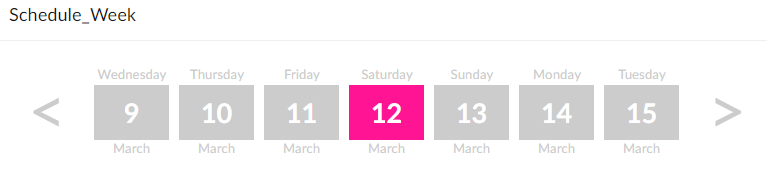
Another article on styling a radio group to become a weekly calendar carousel. In that a radio group displays the days of the week with arrows allowing the user to select the next or previous week. This is a follow on from my other articles on restyling Creator: Zoho Creator: Change Radio into Tabs and Zoho Creator: Decision Box into a Button.
Why?
We can't include JavaScript in a ZohoCreator app without building a JS Widget or using Nodejs... Or we can make do with the tools provided. The brief was similar to the Zoho Bookings interface where their Creator app is to present the user with the days of the week which they can then click on to select a particular day. Some navigation is required in the form of a left arrow and right arrow to see previous or next weeks respectively.
What I have:
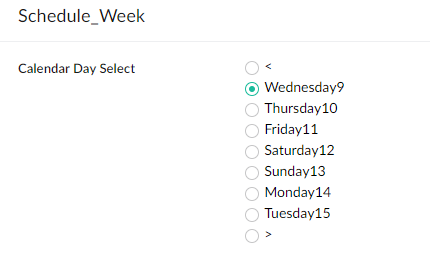
What I want:
How?
This was achieved using some CSS and then some Deluge for the functionality. Let's dig into the CSS and then I'll explain how we made this functional.

Zoho Creator: Shopify API Integration Oauth 2.0 - Update 2022 (Search by SKU GraphQL)
- Category: Zoho Creator
- Hits: 69833
This is an article which is the updated version of my article Zoho Deluge: Push Item to Shopify API for 2022 using the new policy that Shopify have implemented when creating a custom app.
Why?
My use-case scenario here is that we have a Zoho Creator app which comprises of a custom quote builder that staff use to store details about a product, and then to push that product out to their Shopify store with a pre-built description, tags and inventory details. This means the app needs to be able to sync all of its products, customers, and orders with Shopify as a 2-way integration as the Zoho app needs information from additional apps installed on the Shopify store.
Why upgrade to the latest version for Shopify when private apps created before February 2022 won't be deprecated? Because the previous version was limited by our ability to search by product SKU. The new version, taking advantage of GraphQL, will be able to search by SKU and retrieve the correct product ID, variant ID, and inventory ID from Shopify.
How?
The below details on how we set up an access token in Shopify using the new process.
Zoho Creator: eBay: Get Item Transaction
- Category: Zoho Creator
- Hits: 26396
This is the function to get the line item order/transaction from eBay if you give it the eBay Item ID as a parameter.
Why?
Mostly for debugging but here's the code that will quickly get the XML of a GetItemTransactions request to eBay.
How?
You'll need an access token for eBay which I documented on how you can generate one in my article: Zoho Creator: Push to eBay Listings. Then you can use the following code, note that the parameter is the eBay Item ID:

Zoho Creator: Receive eBay Notification and Create Shopify Order
- Category: Zoho Creator
- Hits: 19515
This is an article documenting how to parse the notification from eBay and using it to create an order in Shopify.
Why?
Previously, we would receive an eBay notification and create an order record in Zoho Creator. We did the same for when Shopify would process an order. You can see my following articles for more information on these:
- Zoho Creator: Receive eBay Order Notifications via Webhook
- Zoho Creator: Receive JSON via a Shopify Webhook
How?
I'm going to show you the code first of how to parse the eBay Transaction data and then the code to create a Shopify Order:
Recent Posts


Joes Word Cloud
Accreditation



Donate & Support
If you like my content, and would like to support this sharing site, feel free to donate using a method below:

 bc1qf6elrdxc968h0k673l2djc9wrpazhqtxw8qqp4
 0xb038962F3809b425D661EF5D22294Cf45E02FebF
Paypal:
Bitcoin:
bc1qf6elrdxc968h0k673l2djc9wrpazhqtxw8qqp4
Ethereum:
0xb038962F3809b425D661EF5D22294Cf45E02FebF
Credit where Credit is Due:
Feel free to copy, redistribute and share this information. All that we ask is that you attribute credit and possibly even a link back to this website as it really helps in our search engine rankings.
Disclaimer: Please note that the information provided on this website is intended for informational purposes only and does not represent a warranty. The opinions expressed are those of the author only. We recommend testing any solutions in a development environment before implementing them in production. The articles are based on our good faith efforts and were current at the time of writing, reflecting our practical experience in a commercial setting.
Thank you for visiting and, as always, we hope this website was of some use to you!
Kind Regards,
Joel Lipman
www.joellipman.com