

Frontpage Item Ordering
- Category: Joomla
- Hits: 22704
Having trouble ordering your frontpage articles? After re-ordering articles wondering where it was taking the order it puts the articles in the front page (or landing page) was confusing me. The quick answer is that it is within the menu manager > main menu > menu item section of your Joomla! Admin Panel.
Certain Advanced Parameters in your Menu Item called "Home" must be set correctly for the article ordering you set in your Front Page Manager to take effect.
Language Codes
- Category: Joomla
- Hits: 22864

K2 Items disappear
- Category: Joomla
- Hits: 72724
Basically you've woken up this morning, visited your website, and all your K2 articles are gone !!!!
If you login to your Joomla! administration panel (back-end) and look under k2 items, you should get the following error:
Warning: Invalid argument supplied for foreach() in /home/public_html/administrator/components/com_k2/views/items/tmpl/default.php on line 80
If I went to K2 Comments, I'd get an additional error:
Warning: Invalid argument supplied for foreach() in /home/public_html/administrator/components/com_k2/views/items/tmpl/default.php on line 80

Warning: Invalid argument supplied for foreach() in /home/public_html/administrator/components/com_k2/views/comments/tmpl/default.php on line 145
Invalid arguments passed in router.php on line 325
- Category: Joomla
- Hits: 33962
Thought I'd put this error in here and how I fixed it. Basically because firstly I don't want to have to create an account on someone else's forum just to post my answer and secondly because my solution is a "cowboy fix" rather than the other intelligent solutions on the web.
The issue was that I was building my first Joomla 1.5 component and getting the below error if I put in a menu:
Warning: implode() [function.implode]: Invalid arguments passed in /home/.../public_html/includes/router.php on line 325
Where "..." is the path on your server.
Lazy stats: Yootheme / Gavick Pro / Rocket Theme Comparison
- Category: Joomla
- Hits: 49686
So this is a comparison chart (at least in my opinion) of 3 major joomla template/extension providers. When I'm less caught up in work I'll try adding to this article. But here's some lazy stats:
Gavick - How to add a navigation menu to Image Show
- Category: Joomla
- Hits: 16602
How to make your Joomla site use SEO friendly urls
- Category: Joomla
- Hits: 20428
Basically so that you can set all those SEO settings in the global configuration tab to YES.
Note: you need the permissions to rename the file ("htaccess.txt" to ".htaccess" in your website root folder). You'll need ftp access or a file manager with all your website files in). Do not continue if you ONLY have control of the Joomla CMS.
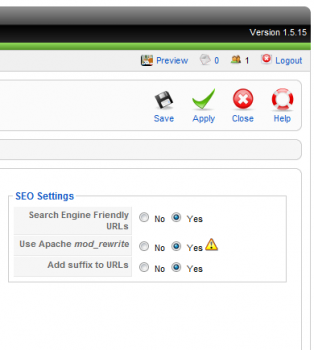
Watch the youtube video below which shows you how to do it
{youtube}UQkeT0o_U34{/youtube}Joomla - How to preview module positions in a given template
- Category: Joomla
- Hits: 20612
To open a web-browser window or tab with this preview, type the following in the address bar after your website URL:
http://www.yourdomainname.com/index.php?tp=1&template=thetemplatename
- where yourdomainname.com is your domain address
- and thetemplatename is the name of the template (without spaces).
Or watch this boring video I made showing you how to do it: {youtube}VDEjI75zN3g{/youtube}
Recent Posts


Joes Word Cloud
Accreditation



Donate & Support

 bc1qf6elrdxc968h0k673l2djc9wrpazhqtxw8qqp4
 0xb038962F3809b425D661EF5D22294Cf45E02FebF