
- Android Studio (Beta) 0.8.6
- Google Android Maps API
What?
I am writing an app for a tablet running Android and wanted to include a Google Map. The following exercise focuses solely on creating an app which opens Google Maps at your current location.
How?
I couldn't find any instructions using the tools I had (Android Studio) which is why I've written this article.
- Start "Android Studio"
- Go to File and create a New Project...
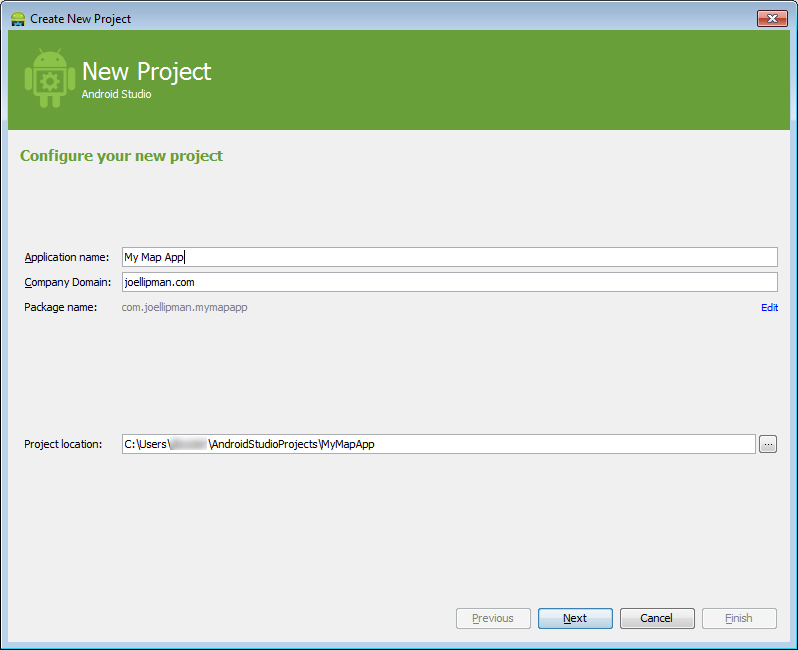
- I'm developing on a Tablet so I select Phone and Tablet then a relatively old version of the Android OS:
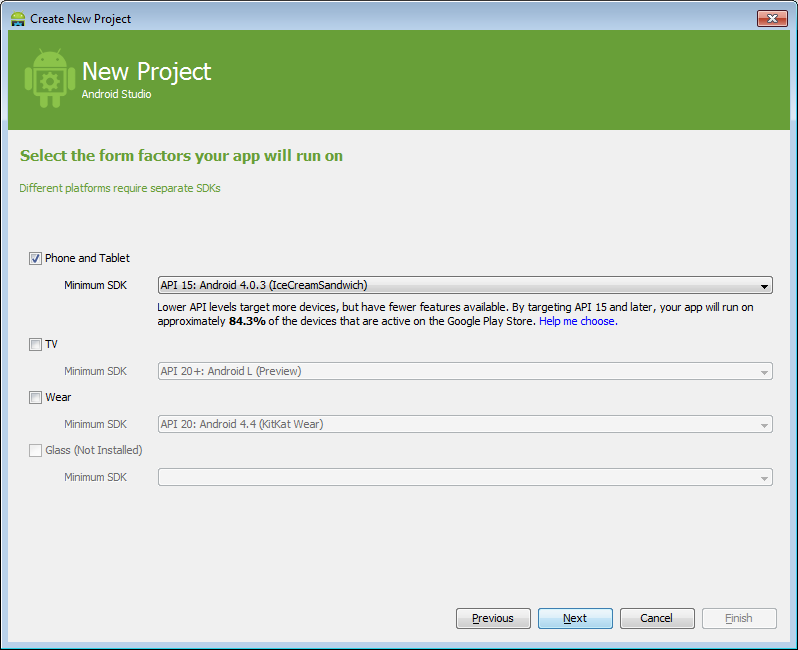
- Add an activity to Mobile: select Google Maps Activity:
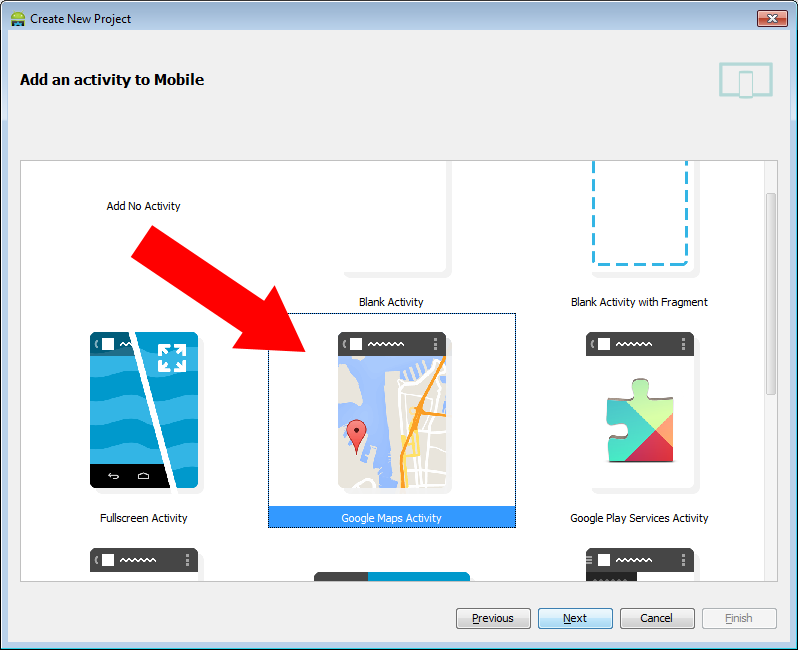
- Change the Title to what you want (don't change the activity or layout) and click on Finish:
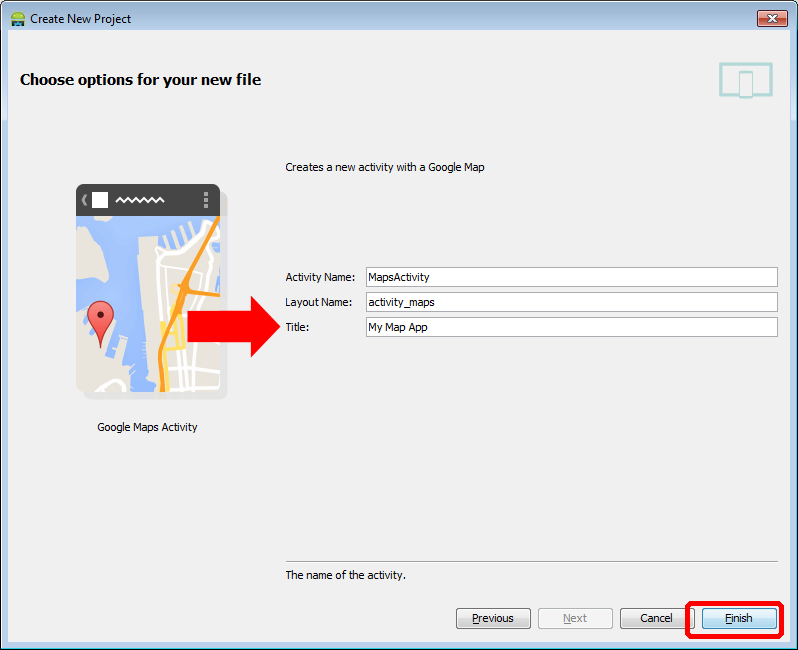
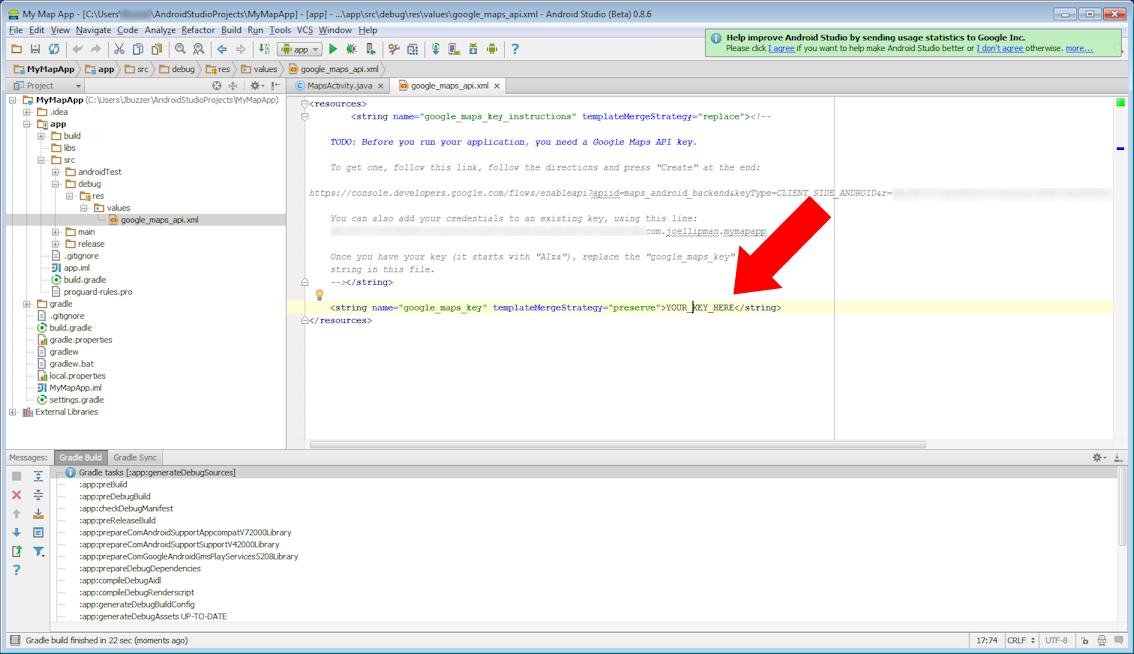
- Get yourself a developers' Google Android Maps API Key (not necessarily the same as Google API Key) and enter it as instructed:
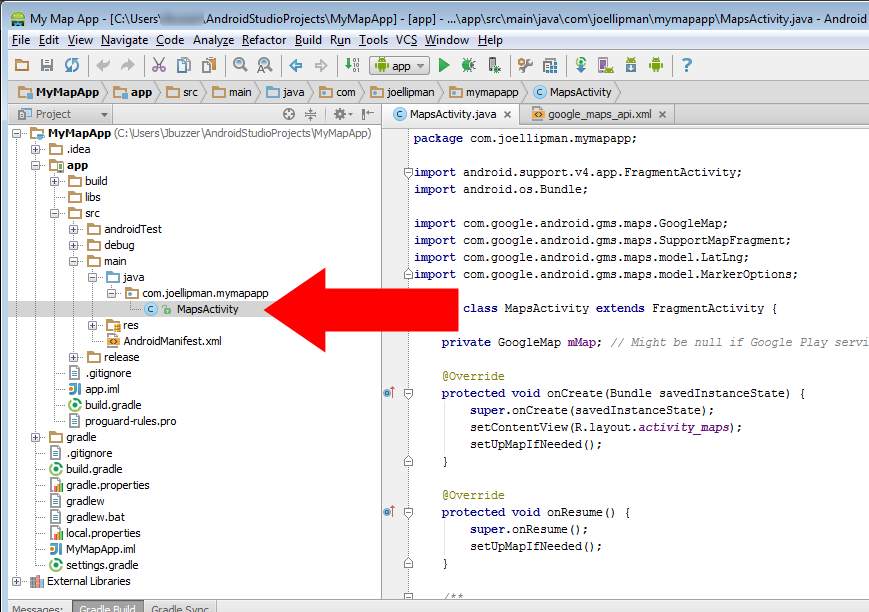
- Change the Java file to open on your current location, find the MapsActivity.java file and open it:
- Change the function setUpMap() to the following code
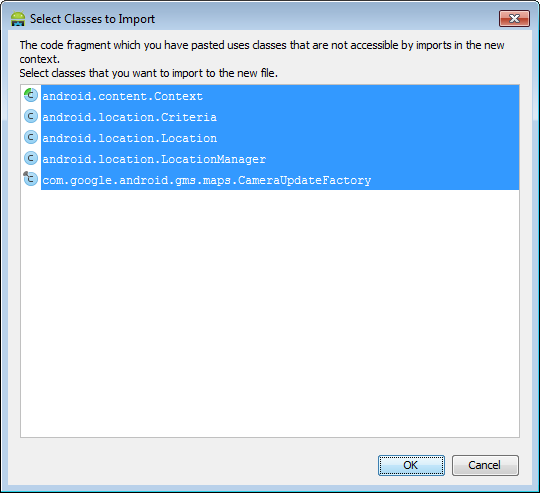
private void setUpMap() { mMap.addMarker(new MarkerOptions().position(new LatLng(0, 0)).title("Marker").snippet("Snippet")); // Enable MyLocation Layer of Google Map mMap.setMyLocationEnabled(true); // Get LocationManager object from System Service LOCATION_SERVICE LocationManager locationManager = (LocationManager) getSystemService(Context.LOCATION_SERVICE); // Create a criteria object to retrieve provider Criteria criteria = new Criteria(); // Get the name of the best provider String provider = locationManager.getBestProvider(criteria, true); // Get Current Location Location myLocation = locationManager.getLastKnownLocation(provider); // set map type mMap.setMapType(GoogleMap.MAP_TYPE_NORMAL); // Get latitude of the current location double latitude = myLocation.getLatitude(); // Get longitude of the current location double longitude = myLocation.getLongitude(); // Create a LatLng object for the current location LatLng latLng = new LatLng(latitude, longitude); // Show the current location in Google Map mMap.moveCamera(CameraUpdateFactory.newLatLng(latLng)); // Zoom in the Google Map mMap.animateCamera(CameraUpdateFactory.zoomTo(14)); mMap.addMarker(new MarkerOptions().position(new LatLng(latitude, longitude)).title("You are here!").snippet("Consider yourself located")); }- If you are prompted to import the classes then agree by clicking OK:
- If you are not prompted,
- you should see some of your code go red like in the following screenshot:
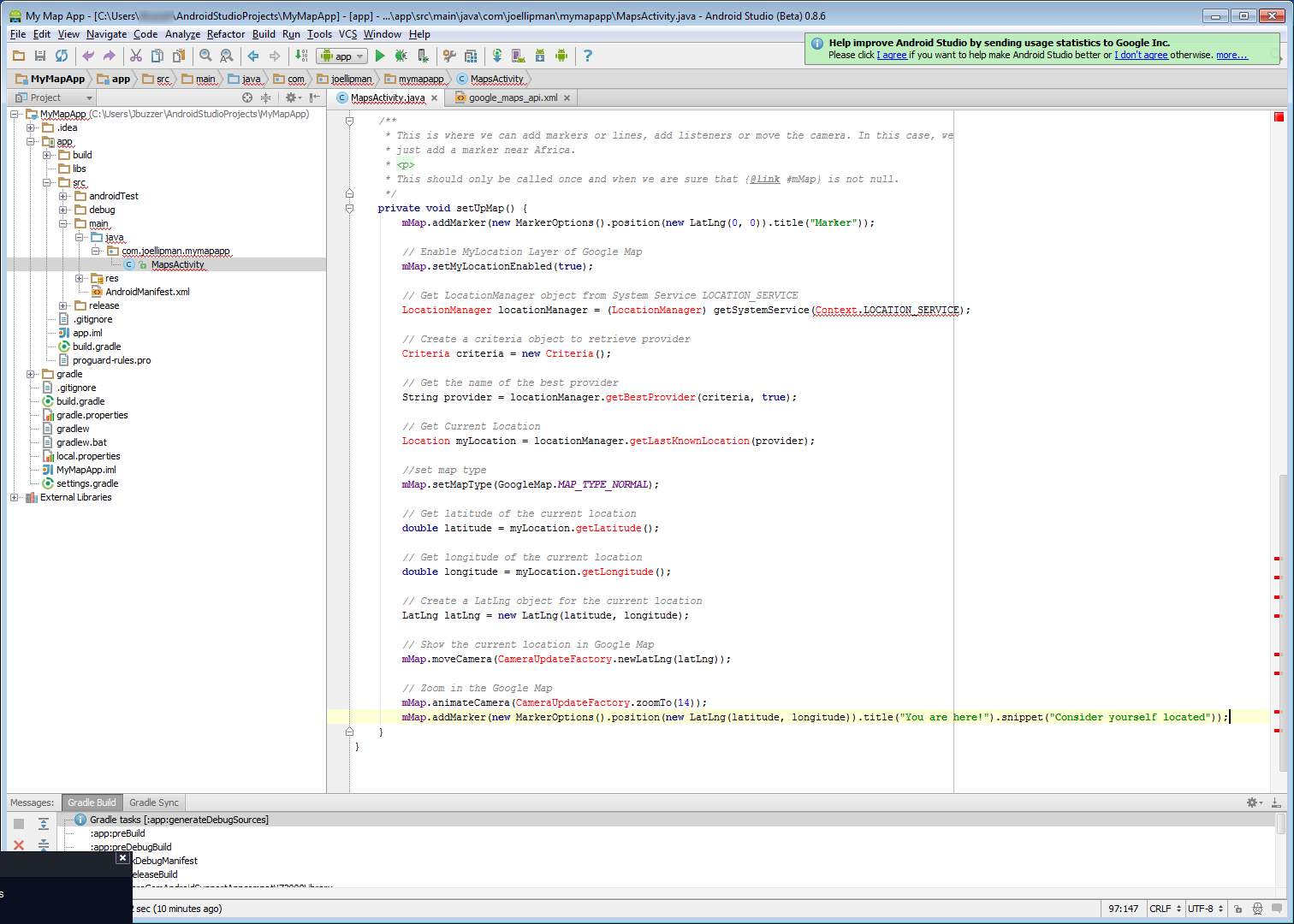
- Focus the cursor on the word and hold down the key and press Enter, then import each class:
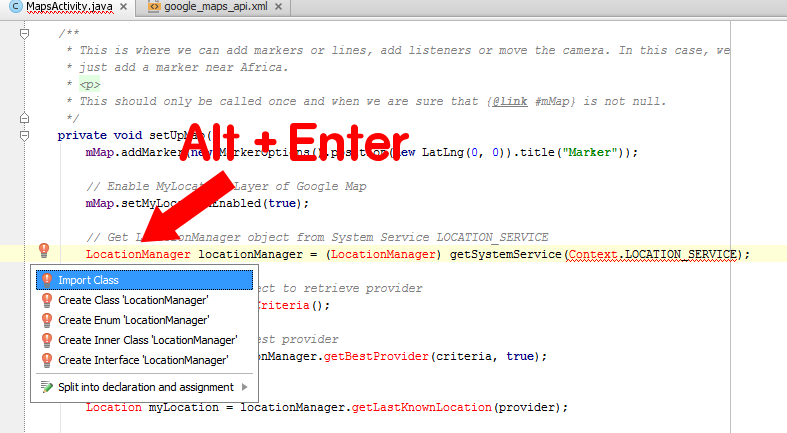
- you should see some of your code go red like in the following screenshot:
- If you are prompted to import the classes then agree by clicking OK:
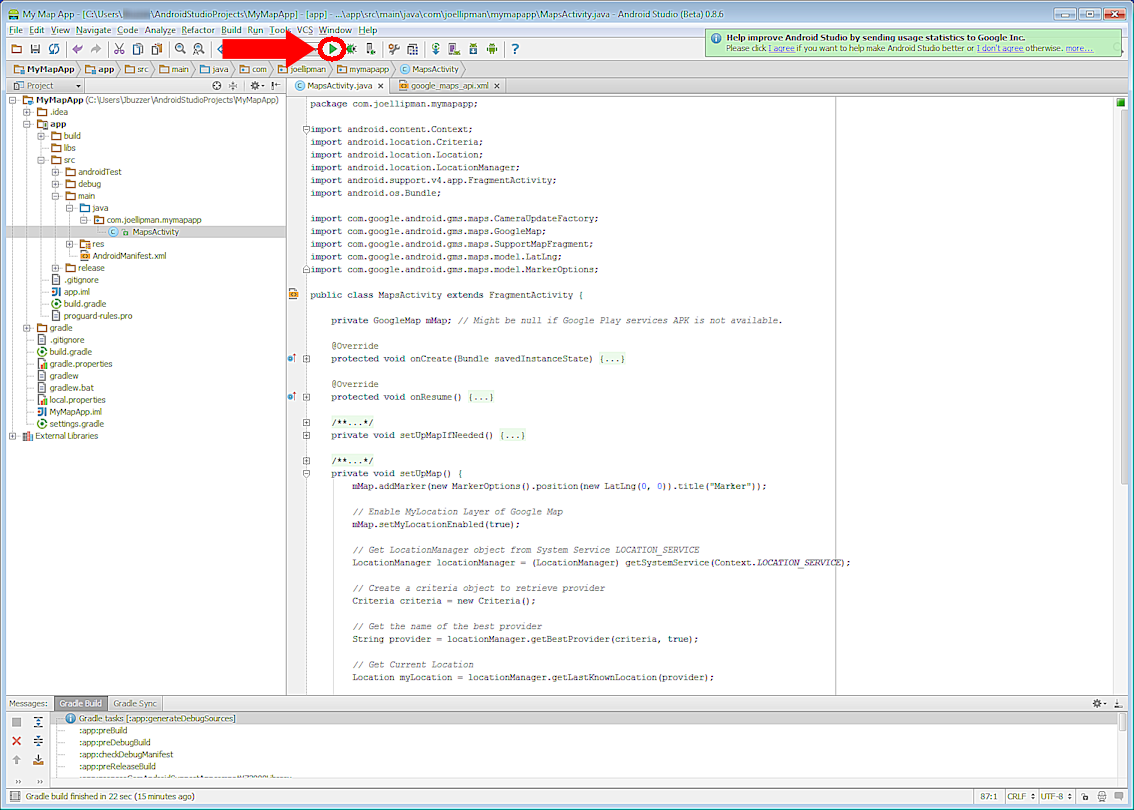
- Your code will now include the imported classes near the beginning, so TEST it!
Addtional:
Problems animating the camera to your current location? I had to add the following:
LatLng myCoordinates = new LatLng(latitude, longitude);
CameraUpdate yourLocation = CameraUpdateFactory.newLatLngZoom(myCoordinates, 12);
mMap.animateCamera(yourLocation);
Additional Additional:
A little more control on the animation?
CameraPosition cameraPosition = new CameraPosition.Builder()
    .target(myCoordinates)      // Sets the center of the map to LatLng (refer to previous snippet)
    .zoom(17)                   // Sets the zoom
    .bearing(90)                // Sets the orientation of the camera to east
    .tilt(30)                   // Sets the tilt of the camera to 30 degrees
    .build();                   // Creates a CameraPosition from the builder
map.animateCamera(CameraUpdateFactory.newCameraPosition(cameraPosition));
Just in case: AndroidManifest.xml
The example above should have populated this correctly but if you are still getting problems, I have the following fields that I also use related to Google Maps v2:
<meta-data
        android:name="com.google.android.gms.version"
        android:value="@integer/google_play_services_version" />
<meta-data
        android:name="com.google.android.maps.v2.API_KEY"
        android:value="@string/google_maps_key" />
<permission
        android:name="package.name.permission.MAPS_RECEIVE"
        android:protectionLevel="signature" />
<uses-feature
        android:glEsVersion="0x00020000"
        android:required="true" />
<uses-library
        android:name="com.google.android.maps" />
<uses-permission
        android:name="package.name.permission.MAPS_RECEIVE" />
<uses-permission
        android:name="android.permission.INTERNET" />
<uses-permission
        android:name="com.google.android.providers.gsf.permission.READ_GSERVICES" />
<uses-permission
        android:name="android.permission.ACCESS_COARSE_LOCATION" />
<uses-permission
        android:name="android.permission.ACCESS_FINE_LOCATION" />
Last Additional
Ensure that when Google asks for your Android API key, you enter the production key (which may be the same as your testing key); the one from your app and not from your computer (as other people don't use your computer to access the service). If your fellow testers only see a grey map, just double-check the key is the right one given to Google Maps.
Follow On Article/Sequel
Next: Article on separating the map into a sub-activity rather than it being the main activity - Android OS: Add GoogleMap as fragment.
i did everything but my app suddenly stopped when i open the map activity, why???
This is one of the BEST set of instructions I really appreciate what you have shared
I wish I'd found it much earlier, as you explained MANY of the pitfalls it getting the map to work
Thanks for the camera update code, it fixed my current problems
Hi dude, i have also find out one good example
GPS Basic Example - Android
Great... thanx a lot.. u saved my project... :)
Hi Linda! The libraries are usually red because they are missing so I'd say download the SDKs for the versions of Android you want to be compatible with. The Alt+Enter is only a shortcut for the red underlined words and that issue is due to the libraries not being imported at the beginning of the java file.
Hi Darshan! I had the same. I was using my computer's google android key rather than my google android map key. Just double-check the keys in the manifest file match up on your google developers console. If not, then maybe the key is restricted (beta users?).
I'm not getting an empty map on my emmulator of android studio, with only Google keyword on screen.
Libraries are still flashed red and so I can't build my solution due to errors. I even tried importing the libraries manually but still they are not recognized.
hello sir if you could give me your email address so that i can ask questions about android programming because i am new to this language it will be very king of you sir............
I developed an app in good barber platform.
If I wanted to favourite one point in map, and keep it in a favoure section what would I have to do?
Anyone can help me?
hello, great post.
Are able to shed some light on having the map rendered from a KML or KMZ file instead.
But still working with the user's location exactly the way you have it.
in other words I want to load a KMZ file i already file, and show my location marker on that map.
Same, :
Attempt to invoke virtual method 'double android.location.Location.getLatitude()' on a null object reference
Hi this is great, but I am having a problem that causes my app to crash.
I am unable to run the getLatitude() and getLongitude(), but if I take that out, I am able to click the get current location button, and that works fine.
thanks
Larry
Hi Colin,
Not sure how you get the red pins as I would like to use those. Are you sending multiple locations?
The example above shows how to display a marker for the current location but you could create another marker at the latitude & longitude you want:
[code]
mMap.addMarker(new MarkerOptions().position(new LatLng(50, 50)).title("Another Marker").snippet("Different to the first"));
[/code]
I recall having problems with using my own images on google maps android api v2 but the following code included in the java is from their documentation:
[code]
private Marker melbourne = mMap.addMarker(new MarkerOptions()
.position(MELBOURNE)
.title("Melbourne")
.snippet("Population: 4,137,400")
.icon(BitmapDescriptorFactory.fromResource(R.drawable.arrow)));[/code]
Source: https://developers.google.com/maps/documentation/android/marker
Hope that helps!
Joe
Hi Joel, this was brilliant cheers, how would I get rid of the red pins that keep dropping on my map app and just have one marker always on the blue dot with my own icon on it?
Nice explanation!
Fresh and functional!
Please, how can send position parameters (lat and long) to the app for displaying the position on the map for those parameters every 10 seconds?
Thanks.
Gustavo
Check to see if 'myLocation' is null after calling locationManager.getLastKnonwnLocation(provider)
This will return null if your device hasn't received a location update in some time. Try opening google maps and setting a location.
check your api key , it may the problem. I had the same problem with my app and the problem was the api key , google was refusing my key for a particulary android phone , so i had to use another key
I am getting only white screen and nothing else.
Afte few Minute it gives error thatUnfortunateky app has Stoppped.
Please reply.
I have done the code as you have specified.
I've just checked all the statements in setupmap() that you suggested, but I can't find anything wrong. The Google Play service may be involved?
I'm not understanding the double android.location.Location.getLatitude() and the system is saying it's null.
Make sure the statements in setupmap() example above are separated and not all in a single line.
[code]
// Get LocationManager object from System Service LOCATION_SERVICE
LocationManager locationManager = (LocationManager) getSystemService(Context.LOCATION_SERVICE);
// Get the name of the best provider
String provider = locationManager.getBestProvider(criteria, true);
// Get Current Location
Location myLocation = locationManager.getLastKnownLocation(provider);
// Get latitude of the current location
double latitude = myLocation.getLatitude();
// Get longitude of the current location
double longitude = myLocation.getLongitude();
[/code]
You can also do a check on location, eg. if (location!=null)
The code you suggest is already in the setUpMapIfNeeded(). I have to add it in the setUpMap() function?
check the mMap , it may be null :
if (mMap != null)
{
// you code here
}
Hello Joel,
I found really useful this page, but when I try to include the SetUpMap() part, the app start to crash at every start.
I checked multiple times and there is nothing wrong with the code.
Sorry for the bad English, this is the crash log:
--------- beginning of crash
05-06 19:03:51.561 1890-1890/lbcorporation.guardieladri E/AndroidRuntime﹕ FATAL EXCEPTION: main
Process: lbcorporation.guardieladri, PID: 1890
java.lang.RuntimeException: Unable to start activity ComponentInfo{lbcorporation.guardieladri/lbcorporation.guardieladri.MapsActivity}: java.lang.NullPointerException: Attempt to invoke virtual method 'double android.location.Location.getLatitude()' on a null object reference
Hi
on testing (step 9) e have a blank screen and nothing more, i tried with the aditional but still blank, some help?
Hi,
It's there a way to capture the directions the Gmaps navigation gives you? Like, when you have to go right at the next corner Gmaps tells you "go right at the next corner". How can i find that function? Thanks, Razvan
Thanks Mellor,
In Android Studio, you also have to build -> clean project if you ever delete files and then replace them with the same name. I've gotten into the habit of using it a lot prior to each release/build.
should be able to solve that by cleaning your project
Build --> Clean Project
Hi Vsiqueira,
I used to get a similar problem if I switched my android device off and on again. The wifi would connect straightaway but it would take about 5 minutes for my location services to start. To resolve this, I added code to check that location services is enabled which as per your message will be [code]
lm = (LocationManager) context.getSystemService(Context.LOCATION_SERVICE);
if (lm==null)
// Toast: inform the user and avoid loading the location service
[/code]
There are lots of solutions that people have used out there, my favorite is one from stackoverflow which checks for location services, and whether this is via GPS or Wifi:
http://stackoverflow.com/questions/10311834/how-to-check-if-location-services-are-enabled
hi, im getting an erro,
in the method MyLocation.getLocation(), return null, how i can resolve this?
Hi Rishikesh,
I use a database on a webserver with all the latitudes and longitudes of the points of interest and my API is a JSON feed back to the mobile device.
Without a database and a webserver, you could use a local file (pref. in XML/JSON) that installs with any updates and that the mobile app reads from.
Does that help? If you need more details, feel free to reply to emails sent from the comment "notifier" of this page.
Joe
At the starting asa I run the app.
I want to show list of garages available near by my current location. How it can be done ???
plzzz give me advice plzzzz
Ok!! The problem is in version of the app and SDK. Thank you, resolved :lol: .
It occurs with Eclipse. Close Eclipse and again open your project freshly and you will see your code running properly.
finally something well explained
thank you very much sir
SOrry ive solved the previous error but having an error
context.LOCATION_SERVICE);
Hi im getting an error
getLastKnownLocation(provider)
can not resolve provider
any hekp
This was very helpful for my school project. Thank you. :D
Hi Rishikesh,
Can you advise at what step you're at or where it's going blank? The setupmap function has the code to get current location and move the map to focus on the area. There is a bit more of the script (in this article) which is for animating the camera around the current location.
It's just showing white screen nothing else.
How can i get the current location ??
Thanx!
Thank you so much!!! This was simple compared to anything else out there! Worked first shot!
Is that how it's spelt? setContentVie( "View". If not try going to build and "clean project". Also go to File and "project structure" to check the SDK and version of the app.
I have problem in "cannot resolved R"
" setContentVie(R.layout.activity_maps);"
:cry:
How to solve this ? :sad:
Yes! finally a simple and working explanation. Thank you!