


Zoho CRM: Client Script Confirmation Box and Popup Mailer
- Category: Zoho CRM
- Hits: 47534
This is an article just repeating a script from the Zoho Kaizen series allowing a confirmation box (something lacking in Zoho Creator - but that every app outside of Zoho has) as well as a popup to email from CRM with a rich-text interface.
Why?
The use-case here is non-existent. It's more of a play around to see what can be achieved and how much this can be customized. The task I've set for myself is as follows:
- Trigger if the contact record has a tickbox called "Extra Confidential" ticked/checked=true
- Popup a confirmation box to proceed or cancel.
- Popup the email from CRM mailer with the to email address, bcc, subject and message content already populated.
How?
The example from the Kaizen series uses a record with canvas mode applied; but I wanted to try it without a canvas to see if we can have this functionality using the out-of-the-box ZohoCRM.

ZCRM Client Script: Correct Decimal Fields OnLoad
- Category: Zoho CRM
- Hits: 44241
This is an article detailing the client script to fix any fields which exceed their decimal places limit in ZohoCRM.
Why?
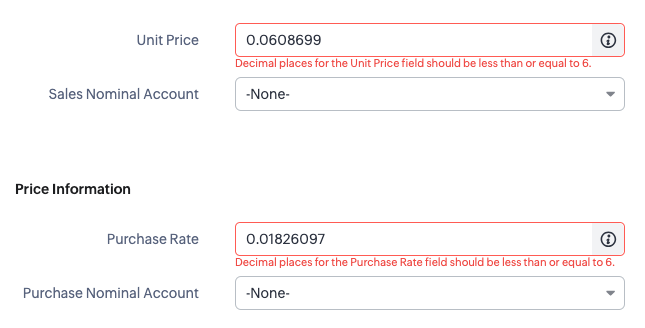
So we have a customer that has some decimal fields on the products module that are calculated and will sometimes return numbers with more than 6 decimal places. As this is more than specified on the ZohoCRM field properties, as soon as the staff user tries to save the record, they will get a validation error on the decimal field even if that's not the field that is being changed:
Decimal places for the Unit Price field should be less than or equal to 6.
How?
The workaround for staff is to round this up manually and then save the record. But this can be an annoying overhead, especially if it can be auto-corrected with a client script.

ZohoCRM & ZohoWriter: Generate Rich-Text / HTML Email Signatures in CRM
- Category: Zoho CRM
- Hits: 66808
This is an article to show you how to, using Deluge code, generate all the email signatures in the user profile in ZohoCRM.
Why?
To simplify the on-boarding process. A client of ours has a rather rich HTML email signature with a profile photo included. When sending an email from CRM, they want CRM to include this rich signature (different per user) at the bottom of the email message.
How?
So there are a few issues with displaying images which would have other solutions, such as hosting the images on a web-server, or converting to a base64 or an SVG. ZohoCRM signatures seem to be unable to handle a lot of code or long URLs such as a base64 source URL for an image.

ZohoCRM: Using Criteria with Module Record Count
- Category: Zoho CRM
- Hits: 49635
An example of code using the new API call "Module Record Count" with some criteria.
Why?
At time of print, I couldn't find an example of how to use this API call with search filters or criteria. Not sure about the rest of you, but I've been using this for pagination purposes and for the system to work out how many pages or loops in total it would need to do.
How?
Here's a couple of working examples I use in production systems:

Zoho CRM: ZDK Client Script: Auto-Select Pipeline based on User Department
- Category: Zoho CRM
- Hits: 30454
A super quick article on how to pre-select the pipeline on deal creation within CRM based on the department specified on a user's profile.
Why?
A client asked that when staff create a deal/opportunity record in CRM, the pipeline is automatically pre-selected based on the user.
How?
So there's a bit of a pre-amble for setting up the fields, we'll then use a client script to automatically read the user's record, retrieve the department, and set the correct pipeline option.

Zoho CRM: Change System Field Length
- Category: Zoho CRM
- Hits: 29671
This is an article documenting how to remove the block on changes to a system field in ZohoCRM.
Why?
Our use-case today is that a customer wanted to map the Postal Code or Zip from a Lead record to an opportunity (or Deal) record. If you are using custom fields, then just ensure that the data type and field lengths match. In this case, they are system fields for the Postal Code which out-of-the-box differ in length so they do not list the postal code on the deal record to be listed in the "Lead Conversion Mapping" page.
In the Leads module, the Zip field is 30 characters; in the deal module, the Zip field is 20 characters... but we need these to match if we want to map them in the "Lead Conversion Mapping" page.
How?
This is a bit of a hack and most likely not recommended... but it is a workaround I have used and that worked when converting a lead to a deal. Note that this hack doesn't work on the system field label name (I tried) just on the length field. Use the translations file to change system field labels

ZohoCRM: Get Organization Business Hours using Deluge/API
- Category: Zoho CRM
- Hits: 46845
A super quick article on getting the business hours set in ZohoCRM.
Why?
When creating a booking system in ZohoCreator, I want to enter the default working shift for an employee either existing or that has been added to the system based on the business hours set at the organization level in ZohoCRM.
How?
Using an invokeURL, the key here is you'll find them in the settings; so check that your connection has the scope to access both Organization details (ZohoCRM.org.READ is enough - perhaps optional) and access to Settings (ZohoCRM.settings.READ). I'm calling mine "mycrmconnection".

ZohoCRM: Integrate ChatGPT to ZohoZIA
- Category: Zoho CRM
- Hits: 93445
Following on from the article: Zoho Cliq: Integrate OpenAI and ChatGPT 3.5 Turbo. This is the next step as we get it to look at data within ZohoCRM.
Why?
Because it is a serious improvement upon ZohoZIA and we get a lot of requests around customizing ZohoZIA...
How?
So taking ideas from my previous article for ZohoCliq; let's use what we know to develop a ZohoZIA for a demo system.
There are several steps, so first we will set up the ZIA action "Ask ChatGPT" using the GUI, then we will capture the question using Deluge code and query the OpenAI ChatGPT API to return a response.
Recent Posts



Joes Word Cloud
Accreditation



Donate & Support
If you like my content, and would like to support this sharing site, feel free to donate using a method below:

 bc1qf6elrdxc968h0k673l2djc9wrpazhqtxw8qqp4
 0xb038962F3809b425D661EF5D22294Cf45E02FebF
Paypal:
Bitcoin:
bc1qf6elrdxc968h0k673l2djc9wrpazhqtxw8qqp4
Ethereum:
0xb038962F3809b425D661EF5D22294Cf45E02FebF
Credit where Credit is Due:
Feel free to copy, redistribute and share this information. All that we ask is that you attribute credit and possibly even a link back to this website as it really helps in our search engine rankings.
Disclaimer: Please note that the information provided on this website is intended for informational purposes only and does not represent a warranty. The opinions expressed are those of the author only. We recommend testing any solutions in a development environment before implementing them in production. The articles are based on our good faith efforts and were current at the time of writing, reflecting our practical experience in a commercial setting.
Thank you for visiting and, as always, we hope this website was of some use to you!
Kind Regards,
Joel Lipman
www.joellipman.com