

Zoho Creator: Radio group into Calendar Carousel
- Category: Zoho Creator
- Hits: 54092
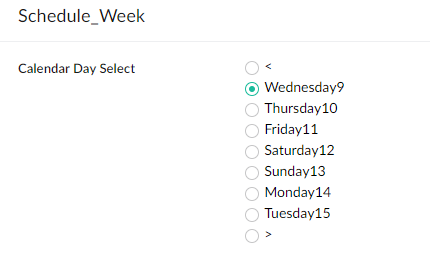
Another article on styling a radio group to become a weekly calendar carousel. In that a radio group displays the days of the week with arrows allowing the user to select the next or previous week. This is a follow on from my other articles on restyling Creator: Zoho Creator: Change Radio into Tabs and Zoho Creator: Decision Box into a Button.
Why?
We can't include JavaScript in a ZohoCreator app without building a JS Widget or using Nodejs... Or we can make do with the tools provided. The brief was similar to the Zoho Bookings interface where their Creator app is to present the user with the days of the week which they can then click on to select a particular day. Some navigation is required in the form of a left arrow and right arrow to see previous or next weeks respectively.
What I have:
What I want:
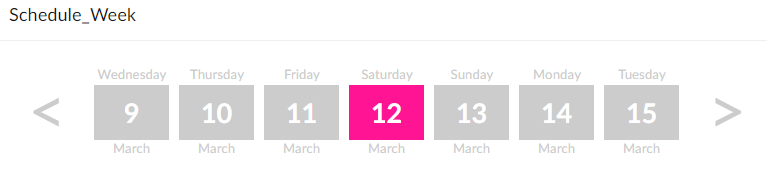
How?
This was achieved using some CSS and then some Deluge for the functionality. Let's dig into the CSS and then I'll explain how we made this functional.

Zoho Creator: Shopify API Integration Oauth 2.0 - Update 2022 (Search by SKU GraphQL)
- Category: Zoho Creator
- Hits: 71847
This is an article which is the updated version of my article Zoho Deluge: Push Item to Shopify API for 2022 using the new policy that Shopify have implemented when creating a custom app.
Why?
My use-case scenario here is that we have a Zoho Creator app which comprises of a custom quote builder that staff use to store details about a product, and then to push that product out to their Shopify store with a pre-built description, tags and inventory details. This means the app needs to be able to sync all of its products, customers, and orders with Shopify as a 2-way integration as the Zoho app needs information from additional apps installed on the Shopify store.
Why upgrade to the latest version for Shopify when private apps created before February 2022 won't be deprecated? Because the previous version was limited by our ability to search by product SKU. The new version, taking advantage of GraphQL, will be able to search by SKU and retrieve the correct product ID, variant ID, and inventory ID from Shopify.
How?
The below details on how we set up an access token in Shopify using the new process.
Zoho Creator: eBay: Get Item Transaction
- Category: Zoho Creator
- Hits: 27143
This is the function to get the line item order/transaction from eBay if you give it the eBay Item ID as a parameter.
Why?
Mostly for debugging but here's the code that will quickly get the XML of a GetItemTransactions request to eBay.
How?
You'll need an access token for eBay which I documented on how you can generate one in my article: Zoho Creator: Push to eBay Listings. Then you can use the following code, note that the parameter is the eBay Item ID:

Zoho Creator: Receive eBay Notification and Create Shopify Order
- Category: Zoho Creator
- Hits: 19967
This is an article documenting how to parse the notification from eBay and using it to create an order in Shopify.
Why?
Previously, we would receive an eBay notification and create an order record in Zoho Creator. We did the same for when Shopify would process an order. You can see my following articles for more information on these:
- Zoho Creator: Receive eBay Order Notifications via Webhook
- Zoho Creator: Receive JSON via a Shopify Webhook
How?
I'm going to show you the code first of how to parse the eBay Transaction data and then the code to create a Shopify Order:

Zoho Creator/Deluge: Calculating with Timezone Offset
- Category: Zoho Creator
- Hits: 43470
This is an article to remind me how to calculate various times for an appointment booking system based on the timezones of each party.
Why?
The use-case scenario is that our Creator server uses the US datacenter but has it's server timezone set to "US/Eastern" or "America/New_York" (-05:00). Our sales person is on the west coast in the timezone "America/Los_Angeles" (-08:00). And our customer is in "Europe/Luxembourg" (+01:00).
We want to tell our customer they have an appointment at 4pm their time in Luxembourg; tell the agent/salesperson to call the customer at 7am in Los Angeles; and tell headquarters or the system calendar that the appointment is at 10am.
How?
So adding a datetime field and calling this one the "Customers Appointment Time" is the wrong first step. Reason being is that datetime fields hold the time zone they are set in (ZohoCreator > Settings > Date and Time Settings); so as soon as you try to insert a date time and perhaps accompany that value with a timezone, several calculations happen in real-time making it really difficult to extract and use.

Zoho Creator/Deluge: UnPredictable exception, Invalid statement found
- Category: Zoho Creator
- Hits: 29378
Just a quick article if you get the above error and what to look for.
Why?
I was writing a function with perhaps too many for each loops within a for loop.
How?
The following is 1 fix for the error:
Execution FailedI cannot guarantee that this error doesn't appear for other reasons but I will add to this article if I encounter any.
UnPredictable exception, Invalid statement found Line:(20)

Zoho Creator: Copy Subform to other Subforms
- Category: Zoho Creator
- Hits: 31445
A quick article on a snippet of code which copies one subform to other subforms in the same form.
Why?
I'm creating an appointment/booking system and I want the user to be able to set entries in a subform called "Mondays" then to click a button which copies it to the remaining working days.
How?
So I have a form with 6 subforms which list staff/employee shifts from Monday to Saturday.

Zoho Creator: Change Radio into Tabs
- Category: Zoho Creator
- Hits: 59276
This is an article to serve as a guide in terms of styling a radio group into a group of Tabs. This is only a guide or reference which was applied for one client but would need adapting to match the colors or style the next client wants.
Why?
The scenario is that my client has quite a long Creator form and instead of scrolling down while entering data, they would prefer if they could have tabs along the top to display each section.
How?
The way we do this is by applying our own stylesheet and overriding certain CSS elements that the vanilla or out-of-the-box Zoho Creator ones provide.