

Zoho People: Reject an Application for Leave in Deluge based on Criteria
- Category: Zoho People
- Hits: 78309
This article documents how to stop an employee from applying for leave when already 80% of their team have already booked the same date off. My brief was:
- Check the department this employee belongs to
- Search for employees of the same department (team members) who have booked the same days off (ie count holiday clashes)
- Prevent an employee for applying for leave if over 80% of the department have already booked the requested dates off.
In other words, if there are 10 people in a department/team, and 8 people have booked tomorrow off, prevent a 9th team member booking tomorrow off.
Why?
I've written this article as it took a while to achieve. The Zoho People application and its API are documented but there are problems with the documentation at the time that this article was written. One is that there are 2 sets of documentation and the other is that the majority of the documentation doesn't refer to OAuth 2.0/json and instead uses the deprecated authtoken v1 and XML.
How?
The trick in this solution was more about the process and what that process was.

Zoho SalesIQ Bot with OpenAI ChatGPT 4
- Category: Zoho SalesIQ
- Hits: 677
An article to document setting up a SalesIQ bot that includes an integration with OpenAI's ChatGPT. Please understand if this is behind a userwall as we tend to charge between 2k to 5k to implement this solution in client's systems.
Why?
Because AI... This is a follow-on from my previous article: Zoho Cliq: Integrate OpenAI and ChatGPT 3.5 Turbo.
How?
It's maybe worthwhile noting here the different handlers of the bot here:
- Trigger Handler: execute when the condition set in the visitor criteria section is fulfullied by the visitor on the website.
- Message Handler: invoked when the the bot receives a message from the website visitor
- Context Handler: invoked when all the answers for a context action are collected.
- Failure Handler: for when there is an error

Zoho Workdrive: Getting Team Folder ID
- Category: Zoho Workdrive
- Hits: 43754
This is an article to document how to get your team folder ID, retrieve information about it, and upload to it via the API.
Why?
The documentation is there but making sense of it, is somewhat difficult, at least for me.
How?
So when I was trying this, I would get either "URL rule not configured" or an unhelpful blank response.

Zoho Inventory: Enable Tracking using the API
- Category: Zoho Inventory
- Hits: 29516
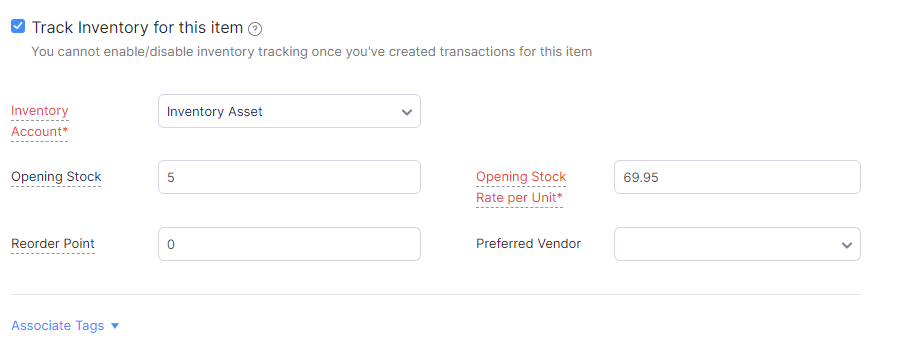
One of these articles because I spent so long trying different snippets of code to enable tracking when using Deluge code to create an item in Zoho Inventory:
Why?
Who uses ZohoInventory for anything else than tracking stock...?
How?
So the quick answer is one missing parameter to send through which is "item_type=inventory"... A little longer, is do ensure you have Zoho Inventory enabled.

ZohoCRM Webhook: Create ZohoInventory Records from an eBay order
- Category: Zoho Inventory
- Hits: 56141
This is a not-so-quick article that queries an eBay order and creates the relevant ZohoInventory item, contact, sales order, package slip, shipment order, invoice, payment records...
Why?
I'm storing this here as a reference and taking the bits that I need for the various clients that request an eBay integration. This is a comprehensive snippet which does the whole lot.
How?
Using the method of "mega-functions", here is the code snippet for one function which will accept as parameter the eBay order reference and generate all the respective records in Zoho Inventory. We're using a ZohoCRM webhook, because CRM webhooks run more reliably then the ones we have found in ZohoBooks and other Zoho Apps.
Zoho Inventory: Mark a package slip as delivered and shipped
- Category: Zoho Inventory
- Hits: 28213
A quick article on a code snippet to mark a package as shipped and delivered in Zoho Inventory.
Why?
As usual, any task like this that takes me longer than an hour, I'd like to document for future use. The use-case is the client has their own delivery drivers and want them to mark a sales order & package as shipped and delivered.
How?
Here's a code snippet that works for me. It is triggered when a user ticks a decision box in Zoho Creator (on iPad displays as an on/off switch). My connection here called "jl_inventory" has the minimum required scopes:
- ZohoInventory.salesorders.READ
- ZohoInventory.packages.READ
- ZohoInventory.shipmentorders.CREATE
- ZohoInventory.shipmentorders.READ

Zoho Inventory Template Issue: First Page is Blank
- Category: Zoho Inventory
- Hits: 18273
So I thought I'd write an article to help me resolve the particular issue where the organization details and the header of the product line items table would display on the first page, the product line items would then print on the second page, with the terms and conditions or small print notes on a third page.
How?

ZohoRecruit: Create Linking Table for Candidates and Associated Job Openings
- Category: Zoho Recruit
- Hits: 54554
This article is just in case it comes up again (has twice now) where a client wants a report on candidates and associated job openings in Zoho Recruit.
Why?
We're creating a custom module where our client wants to query Zoho Recruit via the API but couldn't find a database table to determine who has been associated to what job. In Zoho Recruit reports (Analytics), you can include the "Associate" module which then allows you to link the Candidates to the Job Openings; but my client needed to be able to query this via API and the "Associate" table or whatever it is, was not visible in API...
How?
So we created a custom module called "Candidates x JobOpenings" (with alternative API name as "CustomModule6"). Just to add to the complexity of the task, the client has their own reference for Candidates which they called "Candidate Ref" and their own reference for the JobOpening called "Vacancy Ref". The below outlines the custom module we created and how we populated with associated candidates: