

CSS Add Text to Breadcrumb Link with a Transition
- Category: Cascading Stylesheets
- Hits: 25144
This is an article I hope to refine one day where given a set of breadcrumb hyperlinks, when I hover the mouse over the links, the text changes and the transition between the two is controlled smoothly.
Why?
At time of print, I couldn't find any clear example demonstrating this so here's my take on it:
What I have
» Home / Products / LanternsWhat I want (on mouseover)
// if I hover the mouse over the "Home" link:
» Return to Home / Products / Lanterns

// if I hover the mouse over the "Products" link:
» Home / More Products / Lanterns

// if I hover the mouse over the "Lanterns" link:
» Home / Products / More Lanterns
How?
CSS Printing - Page Break Inside with Headers and Footers
- Category: Cascading Stylesheets
- Hits: 21854
I saw a lot of articles that would cover this but I wanted an example which includes headers and footers and how to get an automatic page-break-inside to not overlap these. Fine on screen but this is obviously for when it comes to printing.
Why?
I needed to create a template in HTML where the first page is a cover page (background image filling the page with a logo floating at the centre) and the next page has a table which is of variable length. Fine when the table was short and didn't have many rows. But the client will pick up the phone to you when the table has too many rows to fit on one page, and this overlaps onto the next, covering the footer and header...
How?
By spending a lot of time spinning on my chair and twiddling my thumbs...
Change div height to fit content
- Category: Cascading Stylesheets
- Hits: 13609
- CSS
- HTML
A quick article on how to get a div layer to increase height based on how a heading fits on a page.
What?
I have a heading like this:
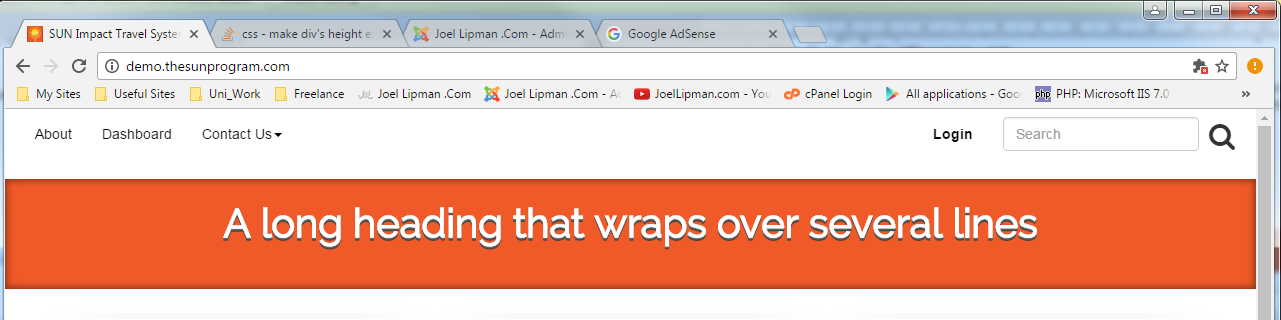
The code of this is:
<div id="page-title" class="col-xs-12">
	<h1><a href="/">A long heading that wraps over several lines</a></h1>
</div>
Ordered List of over 1000 Items
- Category: Cascading Stylesheets
- Hits: 14538
So many people asking this when the solution is a bit of aesthetic styling.
ol{margin:4px}

-- yields
995.
996.
997.
998.
999.
000.      <-- What's going on here then?
001.
002.
Or check out this screenshot of the issue: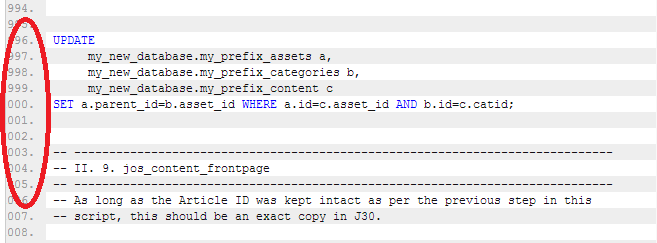
How?
Three boxes, two roll over, one falls out
- Category: Cascading Stylesheets
- Hits: 26803
So this is an article to note an oddity when I was working with a Yootheme template called "yoo_sync". Some clever scripts (both mootools and jquery) using the equalize method to make div layers the same height, and in this case, the same width. It isn't so much a miscalculation of 100% divided by 3 that leaves 1 pixel left over, more the fact that the scripts use that 1 pixel (ceiling rather than floor?).
Why?
We have a row on a website of three boxes made of div layers. When viewed normally on a 15" Laptop, all was good using Chrome and tolerable using MS Internet Explorer. If we maximized the Google Chrome browser, the row would split and there would be 2 boxes on the top row and the third would pop under these. As for MSIE, that was ok when maximized.
How?
You could do loads of code hacks which is what I tested but all for nothing because you always end up needing to specify a third of the width.
Background Gradient Disappears on Long Pages
- Category: Cascading Stylesheets
- Hits: 26726
This is a quick article on how to resolve the following issue:
- Overall body background color is blue.
- Background color of my contents is white.
- When I visit a small page on the site, the contents background (white) shows.
- When I visit a very long page on the site, the contents background disappears and reveals the overall background (blue) making the text very hard to read.
Why?
Took me a while to figure out what was the problem, I'd visit some pages and they'd be fine, but when visiting a long page, it would initially display properly but then the white background would disappear when the page finally loaded.
How?
Vertically align an asterisk on a line
- Category: Cascading Stylesheets
- Hits: 32600
So I have an unordered list of values (*, 1, 2, 3...) and for styling reasons I want the asterisk to be the same size as the numbers but not overlap any list item beneath it. By increasing the size of the asterisk, this often increases the line-height and causes the overall line height to change for other objects in the same row. The problem afterwards was that the asterisk character would overlap the item beneath it (in this case #2) so when a user clicked on #2 they would in fact be clicking on the item containing the asterisk above it.
Objective
| Box List Before: | Box List After |
|
|
How?
CSS keeping the footer at the bottom
- Category: Cascading Stylesheets
- Hits: 32324
Aim:
| Header | |
Left | Right |
| Footer | |
<div id="container">
     <div id="header"></div>
     <div id="content">
          <div id="left"></div>
          <div id="right"></div>
          <div class="push"></div>
     </div>
     <div id="footer"></div>
</div>
SituationThe header displayed fine. The left and right columns finally got them side by side. But the footer that has a background image was under the left and right columns... The main content layer was overlapping the footer. I tried various z-index's bearing in mind that the footer has to be behind because the main content had a semi-transparent layer that overlapped it half-way.
I managed to fix this by including a div push layer which clears both (even though i had clear:both on the css for my #right div layer). For some reason, it has a more forceful effect in its own separate layer.